

A well-planned VoIP phone installation Pearland businesses can put into daily use starts with practical questions: Is the internet and network ready? Where will staff take calls? How will calls move between people and locations? Answering these questions before installation helps prevent avoidable disruption and keeps the new phone setup aligned with daily work.
Begin by mapping who needs a phone, where calls go, and which workflows cannot pause. Then coordinate system planning with network readiness, cabling, and the changeover. This guide covers how to prepare your office, compare installation approaches, and give staff a clear transition plan. SpaceCenter Systems provides business phone systems, network support, and structured cabling for organizations in Pearland and across the Houston area, including Sugar Land, League City, Pasadena, and Friendswood.
Key Takeaways
- Map call flows, staff needs, and business locations before choosing a system approach.
- Assess internet connectivity, network equipment, cabling, and phone endpoints as parts of one installation plan.
- Compare hosted, on-premises, and hybrid approaches by considering ownership, management, and existing infrastructure.
- Use a Pearland site walkthrough and a phased project sequence to coordinate users, setup, testing, and staff transition.
- A planned VoIP phone installation Pearland businesses can rely on connects phone requirements with network readiness and rollout planning.
Why Pearland businesses need a planned VoIP phone installation
How can your office change phone systems without losing focus on customers? Plan around the calls your team handles every day rather than treating installation as a device swap. A well-defined transition gives staff clear call-handling expectations and accounts for the office network, cabling, and work routines.
With Voice over Internet Protocol, or VoIP, business calls travel over an internet connection rather than traditional phone lines. The overview of Voice over IP (VoIP) technology explains the broader technology and its implementations. For a business, the practical point is that phone service depends on more than placing phones on desks. Network readiness and the way people handle calls matter, too.
Installation planning differs from choosing a service plan or comparing phone features. It defines how the system should fit the business, what needs preparation, who owns each task, and how staff will move to the new setup. Map phone workflows before installation begins so the system is configured around how your team serves customers.
Identify the business calls and workflows the system must support
Trace the journey of a typical call. Note who answers incoming calls, how calls are transferred, where unanswered calls go, how staff use voicemail, and who follows up with customers. Include shared lines, team handoffs, and calls that need attention during busy periods. These details turn general phone needs into a useful project plan.
Different Pearland workplaces have different priorities. A small business may need calls directed to the right person while the front desk serves other customers. A healthcare office may need staff to route appointment calls efficiently. A property manager may need calls to reach the right team member across work locations. Record which teams rely on each call path and when a change could affect daily service.
Recognize the risks of treating installation as a simple device swap
Without clear responsibilities, staff may not know who answers the main number, where a transfer should go, or who handles a missed call. These are workflow gaps, not just device issues. Assign an owner to document call routing, explain changes to employees, and gather questions before the transition. Clear ownership keeps decisions visible and reduces last-minute confusion.
Phone readiness also depends on the office environment. Internet connectivity, network equipment, cabling, and phone endpoints need to work together. A site review can identify where phones will be used and whether existing structured cabling fits the planned layout. Staff preparation matters as well: users need to understand the call tasks relevant to their roles and know where to direct questions.
Plan continuity in practical steps. Identify high-impact call periods, coordinate the transition around business activity, and allow time to test agreed call paths with staff. For a VoIP phone installation Pearland businesses can align with daily operations, connect the people plan with technical preparation before the changeover starts.
What a business VoIP installation in Pearland needs to coordinate
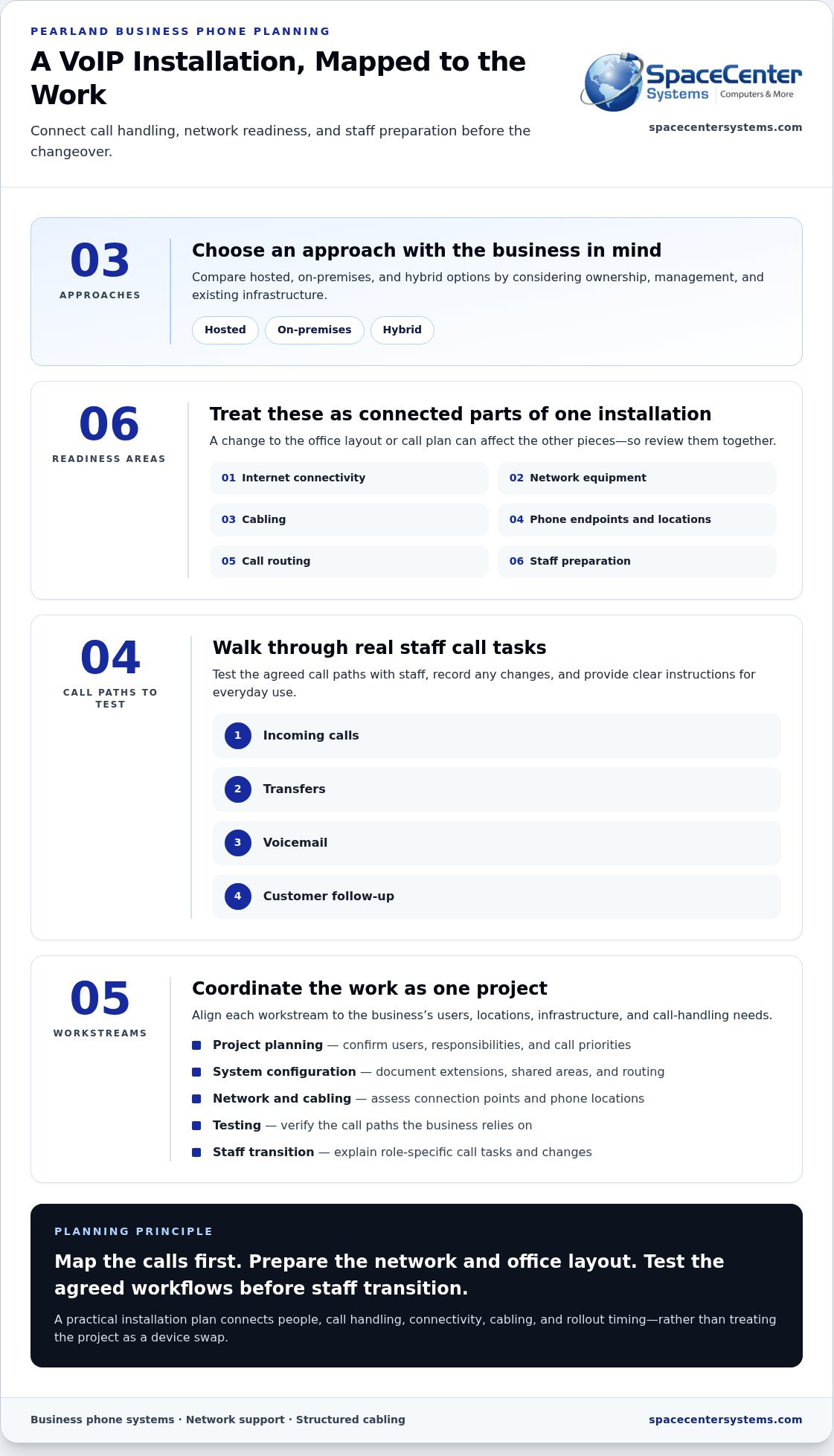
A business VoIP installation brings several workstreams together: project planning, system configuration, network and cabling connections, testing, and staff transition. Treating these as one coordinated project helps surface dependencies before they affect the rollout. The system and configuration should reflect the business’s users, locations, existing infrastructure, and call-handling needs.
Plan internet connectivity, network equipment, cabling, phone locations, call routing, and staff preparation as connected parts of one office installation. If one part changes, the rest may need adjustment. For example, moving a desk can affect where a phone connects and how a team member handles calls.
Check network and cabling readiness before deployment
Start with an office review. Document where phones will be used, identify available connection points, and assess the network against the planned setup. This gives the project team a practical picture of what is in place and where additional preparation may be needed.
Structured cabling or network improvements may be part of the project if existing connections do not align with planned phone locations. A cabling plan coordinates physical connections with the office layout instead of treating them as an afterthought.
Match phone setup to users, locations, and call handling
Translate the business’s call processes into a configuration plan. Document user groups, extensions, shared work areas, and where calls should go at each step. A reception team may need a clear way to direct incoming calls, while clinical administration may organize calls around staff responsibilities. Property operations may need call handling that reflects teams working from different locations.
For distributed staff, include each work location in the plan and clarify how calls should reach the right person. Keep the configuration tied to defined business needs rather than assumptions about what a phone or system can do.
Before staff begin using the new setup, test the call paths that matter to the business. Walk through incoming calls, transfers, voicemail, and follow-up processes using the agreed plan. Record any changes needed, then give employees clear instructions for their usual call tasks.
Coordination also means assigning responsibilities. Business leaders can confirm user groups and call priorities; the technology project team can align configuration with network and cabling readiness; staff can review the steps that affect their roles. This makes decisions visible and gives the rollout a defined sequence without assuming every office needs the same arrangement.
For a VoIP phone installation Pearland businesses can tailor to their office, SpaceCenter Systems connects business phone planning with network support and structured cabling. A project consultation helps organize those needs into a coordinated installation plan.
How to compare VoIP installation approaches without overlooking business needs
Hosted, on-premises, and hybrid VoIP approaches describe where parts of the phone system are managed and supported. The label alone will not tell you whether an approach fits your business. Ownership, internal IT responsibilities, current infrastructure, work locations, and call-handling needs all shape the decision.
Use these broad distinctions as a starting point. Since management responsibilities can vary by project, define ownership and infrastructure needs as part of the installation plan.
Compare hosted, on-premises, and hybrid deployment considerations
In a hosted approach, the phone system is generally managed outside the business, with calls relying on an internet connection and the office network. An on-premises approach places key system equipment at the business, making local infrastructure and responsibility for its management central considerations. A hybrid approach combines elements of both, so the project must account for how those parts connect and who supports them.
| Approach | Management responsibility | Infrastructure considerations | Rollout planning |
|---|---|---|---|
| Hosted | System management generally sits outside the business; clarify how responsibilities are shared. | Review internet connectivity, network readiness, cabling, and phone locations. | Coordinate configuration and staff transition with the hosted system’s setup process. |
| On-premises | The business has a central role in managing equipment located at its site. | Include space and connections for system equipment, along with the network and endpoints. | Plan equipment setup, configuration, testing, and the team responsible for ongoing management. |
| Hybrid | Responsibilities may be divided between local and hosted components. | Map how the components connect to existing infrastructure and each other. | Set clear ownership for each part and test the complete call path. |
These are planning distinctions, not promises about performance or cost. Existing equipment, internal IT capacity, and project scope can change what each approach requires. Avoid choosing based on a label alone.
Choose evaluation criteria that reflect the way the business operates
Compare each approach with the way your team works. Consider whether call handling supports current workflows, how staff across locations will be included, and who will coordinate configuration and ongoing support. Include network support and business continuity so phone planning fits alongside the systems the office depends on.
Start with business requirements, then identify the infrastructure and responsibilities each approach involves. For a VoIP phone installation Pearland businesses can plan with fewer assumptions, SpaceCenter Systems connects phone, network, and cabling considerations through a project consultation. This turns a high-level comparison into a rollout plan shaped around the office.
A practical VoIP phone installation plan for Pearland offices
A clear sequence keeps decisions, site preparation, and staff communication moving together. A site walkthrough in Pearland makes the plan specific to the actual workspace, rather than relying on assumptions about where people work or how calls move through the business.
Prepare the office and schedule the rollout
Before work begins, document users, current call flows, phone locations, and operational constraints. Coordinate access to work areas and the network or cabling infrastructure involved. Identify teams that serve customers or handle business-critical calls so the transition can be organized around their responsibilities.
- Gather requirements. Confirm the teams, users, locations, and call-handling needs included in the project. Record important handoffs and work periods that should shape the rollout.
- Walk through the Pearland office. Review intended phone locations, connection points, work areas, network equipment, and cabling. Note where the planned layout and existing infrastructure need coordination.
- Assign project responsibilities. Identify who approves call-routing decisions, coordinates office access, communicates with employees, and manages technical tasks. Clear ownership helps prevent open questions from surfacing during the transition.
- Set the rollout sequence. Group work in a practical order, taking account of customer-facing and business-critical teams. Share the sequence with affected staff so they know what is changing and when their participation is needed.
SpaceCenter Systems supports businesses across the Houston area, including Pearland, with Houston-area business technology support. The same project discipline applies: align people, locations, network needs, and phone setup before deployment.
Test, hand over, and support the transition
Test against the agreed call plan, not just to confirm that phones connect. Check representative incoming calls, internal transfers, voicemail handling, and the user workflows identified during discovery. Include employees who use those call paths every day, and note any adjustments needed before the rollout is complete.
Prepare concise instructions for the functions people use in their roles. A reception team may need guidance on call routing, while other employees may need to know how to transfer calls or retrieve messages. Give staff a clear point of contact for handover questions and collect feedback after the new setup is in use.
A post-installation review closes the loop. Compare working call paths with the original requirements, record remaining adjustments, and confirm who handles follow-up questions. Ongoing IT and network support can address connected technology needs as the business changes. A coordinated VoIP phone installation Pearland offices can build around their workflows includes this handover, not just the physical setup.
Plan your Pearland VoIP installation with a local technology partner
A business phone project touches more than the phones themselves. It connects employee call needs with internet access, network support, cabling, and rollout timing. A project consultation brings these considerations into one planning conversation, helping Pearland decision-makers define a practical scope before installation begins.
SpaceCenter Systems serves businesses in Pearland and the Greater Houston area, coordinating business phones, IT support, cybersecurity, and structured cabling. Reviewing these areas together can help identify dependencies early. A planned phone location may affect cabling work, while network readiness can shape the order of configuration and testing. Coordinated planning helps reduce avoidable operational disruption while accounting for the needs of each office.
Coordinate phone deployment with the wider technology environment
Phone, network, and low-voltage planning are connected. Reviewing them together helps align the office layout, connection points, user needs, and rollout sequence. It also clarifies responsibilities: business leaders define call priorities, while technology staff coordinate infrastructure and setup. Ongoing network monitoring services provide visibility into network health, an important part of the environment that supports business communications.
Support planning matters after deployment, too. A clear handover helps staff know where to direct questions, while coordinated IT and network support can address connected technology needs as they arise. Planning this follow-through does not remove every operational risk, but it gives the business a defined path for managing the systems involved.
Make the next step clear for Pearland decision-makers
Prepare for a consultation by gathering the office locations involved, an estimate of user counts, current call flows, and known network or cabling constraints. Note which teams handle customer-facing or time-sensitive calls, along with planned office changes that may affect phone locations. This gives the project discussion a concrete starting point.
SpaceCenter Systems connects those business requirements with network readiness, cabling considerations, and rollout planning. The goal is a scope that reflects how the office works rather than a generic setup. A coordinated VoIP phone installation Pearland businesses can plan with confidence starts with clear requirements and a local partner who understands the wider technology environment.
Set your phone project up for a confident next step
A business phone change is also an opportunity to make sure communication processes still fit the way your team works. Before moving forward, decide what a successful transition should look like for employees and customers, and who will own each decision. That clarity keeps planning focused as your VoIP phone installation Pearland project takes shape.
SpaceCenter Systems works with Pearland businesses on practical technology planning. Bring your priorities and questions to an IT assessment or project consultation, then use the discussion to shape an installation plan that fits your office. You do not need every technical detail settled before planning begins.
A clear plan gives your team a solid starting point. Schedule an IT assessment or project consultation with SpaceCenter Systems to plan business phones, network readiness, and cabling for your Pearland office.
Frequently Asked Questions
Can a business keep its existing phone number when moving to VoIP?
In many cases, a business can transfer existing numbers to a VoIP service, but the outcome depends on the number and transfer process. Include every number the business wants to retain in the project plan, including lines used for public listings or customer callbacks. Coordinate transfer timing with installation, and keep the existing service in place until the transition is complete to avoid an unintended gap.
Will VoIP phones work if the office internet connection goes down?
Phones relying on the office’s internet connection generally cannot place calls through that connection during an outage. Businesses can plan for this possibility by discussing an alternate connection or call-handling arrangement as part of the system design. The right contingency depends on the configuration and business needs. Include outage procedures in staff instructions so employees know how to handle urgent calls if connectivity is interrupted.
Can a business use its existing desk phones with a VoIP system?
Sometimes, but compatibility depends on the desk phones and the VoIP system being installed. Before planning around existing equipment, create an inventory of phone make and model, where each phone is used, and how it connects today. That information helps determine which devices can be included in the project and which locations may need different equipment. Do not assume a phone designed for a traditional line will work unchanged.
How can a business reduce disruption during VoIP phone installation?
Plan the changeover around the business calendar and identify times when teams cannot easily pause call handling. For VoIP phone installation Pearland businesses can manage more smoothly, prepare a staff communication plan, assign a contact for questions, and test representative call scenarios before wider handover. Keep a record of unresolved items and who owns each follow-up, so staff are not left guessing during the transition.
Does VoIP phone installation require new office cabling?
Not always. Whether existing cabling can support the planned phone locations depends on the office layout, connection points, and condition of the infrastructure. A site review can identify whether current cabling fits the design or whether changes should be included in the project. Share planned desk moves or renovations early, since they may affect connection locations and installation coordination.
What information should an office prepare before a VoIP installation consultation?
Bring a list of phone numbers the business wants to retain, an inventory of existing desk phones, and a simple office layout showing work areas and planned phone locations. Note upcoming office moves or renovations, important call-handling needs, and known connectivity concerns. If several people will make decisions, identify who can approve routing and rollout choices. These details help keep the consultation focused on the actual project.
Can VoIP support employees working from more than one location?
Yes, a VoIP system can be planned for employees across multiple locations, depending on the system configuration and each location’s connectivity. Start by identifying which teams work at each site, how customers should reach them, and whether calls need to move between locations. Include remote staff in the call-flow plan so their role in answering or returning calls is clear across the business. For organizations managing distributed offices or international operations, telecommunications specialists such as Nexgen Australia show how modern VoIP solutions can be tailored to connect teams across different sites smoothly.
Find our answers helpful?
Add SpaceCenter Systems as a preferred source on Google to see more of our articles and answers in your search results.