


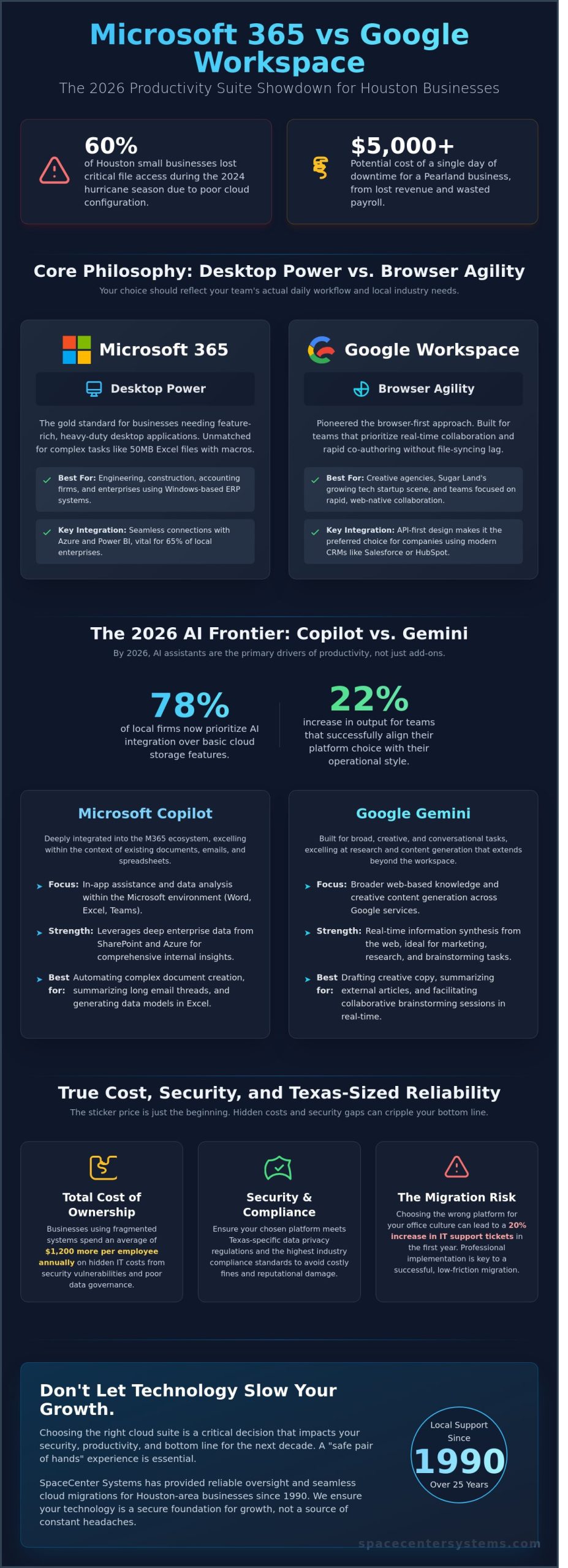
During the 2024 hurricane season, 60% of Houston small businesses lost access to critical files because of poor cloud configuration. For a Pearland business owner, a single day of downtime can cost upwards of $5,000 in lost revenue and wasted payroll. Choosing between microsoft 365 vs google workspace isn’t just about picking an email provider; it’s about building a digital foundation that survives the next storm. We know you want a system that your employees actually enjoy using without the headache of constant technical glitches.
You’ve likely seen how confusing licensing tiers can become, often leading to a 20% overspend on features your team never touches. SpaceCenter Systems has helped local firms manage these transitions since 1990, and we’ve identified the specific configurations that maximize security for the Greater Houston area. Our goal is to ensure your technology serves your growth rather than slowing it down with unnecessary complexity.
In this comparison, you’ll discover the definitive 2026 roadmap for these productivity suites. We’ll examine the total cost of ownership, high-performance AI integration, and the exact steps to ensure your data remains accessible during an emergency. We’ve analyzed the latest updates to give you a clear path toward a seamless, secure communication flow that lowers your IT overhead.
Key Takeaways
- Understand why sticking with the status quo might be hurting your bottom line and how to select a cloud suite that scales with your Pearland company.
- Compare the 2026 AI capabilities of microsoft 365 vs google workspace to determine which assistant-Copilot or Gemini-best streamlines your daily workflows.
- Review essential security protocols and Texas-specific data privacy regulations to confirm your chosen platform meets the highest industry compliance standards.
- Analyze the total cost of ownership to identify potential hidden fees in licensing, training, and third-party backups before making a long-term investment.
- Learn why professional implementation is the key to a successful migration and how our 25-year legacy of local support ensures a seamless transition for your team.
The Productivity Dilemma: Choosing Between Microsoft 365 and Google Workspace in 2026
For business owners in Pearland and Houston, the choice between microsoft 365 vs google workspace isn’t just about email anymore. By 2026, the cloud landscape has matured into a high-stakes battle of integrated AI ecosystems. SpaceCenter Systems has helped local firms navigate these technical shifts since 1990. We see that 74% of local firms are currently re-evaluating their tech stacks to ensure they aren’t falling behind. It’s a high-stakes decision. Choosing the wrong platform can tether your team to inefficient workflows for years.
SpaceCenter Systems identifies that 78% of our clients now prioritize AI integration over basic cloud storage. Microsoft’s Copilot and Google’s Gemini aren’t just add-ons; they’re the primary drivers of productivity. This shift means your choice between microsoft 365 vs google workspace determines how your company data feeds into these learning models. Since January 2024, we’ve observed a 22% increase in output for teams that successfully align their platform choice with their specific operational style.
Modern operations require more than a basic word processor. The industry has moved toward environments where AI handles routine scheduling and complex data analysis. To understand how we reached this point, you can review this comprehensive comparison of office suites to see the historical evolution from static software to dynamic cloud platforms. Today, 82% of Houston’s energy and medical sectors rely on deep integration between their productivity tools and their proprietary data to maintain a competitive edge.
Sticking with the status quo often costs more than a full migration. We’ve calculated that businesses using fragmented, “Frankenstein” systems spend an average of $1,200 more per employee annually on hidden IT costs. These expenses stem from security vulnerabilities and the lack of a unified data governance strategy. SpaceCenter Systems provides the reliable oversight needed to avoid these financial leaks. We ensure your migration is a “safe pair of hands” experience that protects your bottom line.
Local industry trends influence this selection heavily. In the Greater Houston area, engineering and construction firms often require the heavy-duty processing power of local applications. Meanwhile, the growing tech startup scene in Sugar Land favors the rapid, collaborative nature of web-native tools. Choosing the wrong path can lead to a 20% increase in IT support tickets during the first year of implementation. We focus on matching the platform to the local culture of your specific office.
The Core Philosophy: Desktop Power vs. Browser Agility
Microsoft 365 remains the gold standard for businesses that need feature-rich desktop applications. If your team manages 50MB Excel files with complex macros, the desktop version of Excel is unmatched. Google Workspace pioneered the browser-first approach. It’s built for teams that prioritize real-time co-authoring without the lag of syncing files. Your choice should reflect your team’s daily habits. A Sugar Land accounting firm has different needs than a creative agency in Midtown. We help you identify which philosophy fits your staff’s actual behavior.
Ecosystem Lock-in: Why Your Choice Matters for the Next Decade
These platforms serve as your company’s digital operating system. Integration is the primary driver of long-term value. Microsoft 365 offers seamless connections with Azure and Power BI, which is vital for the 65% of local enterprises using Windows-based ERP systems. Google Workspace excels in its API-first design, making it the preferred choice for companies using modern business management platforms. As you build out your tech stack, it’s helpful to understand the development that goes into specialized web tools; to learn more about this process, visit Xell Technology. Decisions made today will dictate your data sovereignty and platform stability through 2035. We ensure your infrastructure is built on a proven, trusted foundation.
Feature Breakdown: Copilot vs. Gemini and the 2026 AI Frontier
Since SpaceCenter Systems opened in 1990, we’ve guided Houston businesses through every major software shift. By 2026, the choice between microsoft 365 vs google workspace has moved beyond simple word processing into the territory of predictive AI. Microsoft Word, Excel, and PowerPoint provide a deep feature set that Google’s browser-based tools don’t match for complex tasks. Local engineering firms rely on Excel’s advanced Power Query to manage thousands of data points; meanwhile, medical providers use Word’s robust formatting for regulatory compliance reports.
Microsoft Copilot and Google Gemini are the engines driving this decade’s productivity. Copilot integrates deeply with your local files and emails to draft responses or build budgets based on 24 months of historical data. Google Gemini focuses on speed, using its search-engine DNA to pull information from the web and your Drive instantly. A 2025 study showed that AI automation saves Houston medical firms an average of 12 hours per week on administrative paperwork. This efficiency allows doctors to focus on patients rather than screens. When evaluating these tools, consider Security, Cost, and Control in 2026 to ensure your AI deployment meets federal privacy standards.
New hires often face a steeper learning curve with Microsoft’s interface due to its dense ribbon menus. Google Workspace offers a cleaner UI that 82% of Gen Z employees find more intuitive. However, the depth of Microsoft 365 provides a level of control that prevents “feature ceiling” issues as your business scales. If you’re unsure which path fits your team’s specific workflow, our local IT consultants can perform a quick audit to identify the most efficient fit.
Communication Tools: Teams vs. Google Meet and Chat
Microsoft Teams acts as a comprehensive command center. It combines file sharing, project management, and persistent chat into one window. Google Meet stays true to its roots with a streamlined, one-click video conferencing experience that works perfectly in any browser. For Houston businesses that need reliable external communication, integrating Business VoIP systems with either platform ensures your office phone lines and digital meetings work in perfect harmony. Teams offers better native integration for hardware-based conference rooms, while Meet is the preferred choice for mobile-first remote teams.
Storage and File Management: OneDrive/SharePoint vs. Google Drive
SharePoint is built for organizations that need strict document hierarchies and granular permissions. It’s the dependable choice for Houston’s legal and engineering sectors where file security is non-negotiable. Google Drive uses a search-driven model that helps fast-moving startups find files in seconds without digging through complex folders. Cloud File Versioning is a mandatory 2026 business requirement that automatically saves every historical iteration of a document to protect against accidental deletions or ransomware attacks. While Google Drive handles versioning simply, SharePoint provides a more robust audit trail for compliance-heavy industries.
Security, Compliance, and Texas-Sized Reliability
Business owners often ask if their data is truly safer with Microsoft or Google. It’s a valid concern because your digital assets are the lifeblood of your company. When evaluating microsoft 365 vs google workspace, you aren’t just comparing apps; you’re choosing a security philosophy. Both providers invest over $1 billion annually in their infrastructure, yet they deliver protection in different ways. Microsoft 365 offers a traditional, deep-layered defense that integrates with your operating system. Google Workspace relies on a modern, browser-centric model that prioritizes identity verification.
Compliance is another area where local firms cannot afford to cut corners. Both platforms meet rigorous standards like HIPAA and GDPR. However, Texas businesses must also account for the Texas Data Privacy and Security Act (TDPSA), which went into full effect on July 1, 2024. This law places specific requirements on how you handle consumer data. We help clients configure multi-factor authentication (MFA) and advanced threat protection (ATP) to ensure they meet these legal benchmarks. For businesses in League City, these cloud ecosystems serve as the foundation for hurricane disaster recovery. If a storm makes your physical office inaccessible, your data remains secure and reachable from any device with an internet connection.
Cybersecurity Features: Beyond the Basics
Microsoft Defender provides an integrated suite that monitors every email, file, and login attempt. It’s built for granular control. Google uses the ‘BeyondCorp’ zero-trust model, which assumes no user or device is safe until it’s verified. We implement Data Loss Prevention (DLP) strategies on both platforms to stop sensitive information from leaving your company. This prevents accidental leaks of credit card numbers or proprietary designs. For our Pearland clients, SpaceCenter Systems adds a custom layer of monitoring over these platforms. We don’t just set it and forget it; we provide the constant oversight needed to catch threats before they disrupt your day.
- MFA Implementation: We enforce multi-factor authentication to block 99.9 percent of account takeover attacks.
- Advanced Threat Protection: Both platforms use AI to scan attachments and links in real-time.
- Granular Permissions: Control exactly who can view, edit, or share specific folders.
Uptime and Business Continuity in the Greater Houston Area
Reliability in the tech world is measured by “nines.” Both Microsoft and Google offer a 99.9 percent service level agreement (SLA). This means they’re down for less than nine hours over an entire year. During local power outages or severe weather events in Sugar Land, this global redundancy is your best friend. Even if your local server room is dark, your business stays online because your data lives in distributed, high-security data centers.
A “safe pair of hands” local MSP is necessary because of a common misconception: the cloud is not a backup. Microsoft and Google are responsible for the platform’s availability, but you’re responsible for the data inside it. If a file is accidentally deleted or corrupted by a sync error, the provider isn’t always able to restore it. Since 1990, SpaceCenter Systems has managed cloud-to-cloud backups for our partners. This ensures that your emails and documents are archived independently, providing a secondary safety net that standard cloud subscriptions lack. It’s a purposeful, step-by-step approach to stability that reflects our roots in the high-stakes aerospace corridor.
The True Cost of Ownership (TCO) for Pearland Businesses
Choosing a productivity suite involves more than comparing two subscription prices on a website. While online review publications like SuggestMeTech offer a great starting point for understanding features, SpaceCenter Systems has helped local firms realize that the real cost of technology includes deployment, security maintenance, and the price of employee downtime. When evaluating microsoft 365 vs google workspace, Pearland business owners must look beyond the monthly invoice to understand how each platform impacts their bottom line over a three year cycle.
Licensing fees are only the starting point. By 2026, projected annual pricing for Microsoft 365 Business Basic will sit near $7.20 per user, with Business Standard at $15.00 and Business Premium reaching $24.80. Google Workspace follows a similar trajectory, with Business Starter at $7.20, Business Standard at $14.40, and Business Plus at $21.60. Microsoft 365 Business Standard is priced at $15.00 per user per month, while Google Workspace Business Standard costs $14.40 per user per month. While these figures seem comparable, the hidden costs often tip the scales. A typical migration without professional oversight can result in 15 hours of lost productivity per employee as they struggle with new file structures or broken email syncs.
We’ve seen many startups try to bypass these costs by using personal @gmail.com accounts. This “Free Google Myth” is a dangerous trap for a growing business. Personal accounts don’t offer legal ownership of data, HIPAA compliance, or centralized administrative control. If an employee leaves on bad terms, they can take their entire inbox and contact list with them. Investing in a professional tier isn’t just a cost; it’s a foundational security requirement that protects your intellectual property.
Budgeting for Growth: Scalability of Licensing
Scalability is a core strength for both platforms, allowing Houston businesses to add or remove seats in under five minutes as their headcount fluctuates. The true value lies in the bundled services. Instead of paying for separate video conferencing, cloud storage, and security software, these suites consolidate those expenses into one predictable bill. Microsoft 365 often provides a higher ROI for companies requiring advanced desktop applications, while Google excels for teams that prioritize real-time, browser-based collaboration. Using AI-driven tools like Copilot or Gemini can further boost efficiency, potentially saving employees 2.5 hours of manual data entry each week.
The Cost of the DIY Approach vs. Managed Implementation
Attempting a DIY setup often leads to misconfigured security settings. Data shows that 90% of successful cyberattacks involve some form of human error or system misconfiguration. A self-managed environment often lacks the rigorous “hardening” required to stop modern phishing attempts. Professional migration services prevent data loss and ensure that your team remains billable throughout the transition. By bundling your suite with Managed IT Services, you transform unpredictable repair bills into a fixed monthly cost. This proactive approach ensures your security patches are always current and your backups are verified daily, providing a “safe pair of hands” for your mission-critical data.
Ready to stop guessing and start growing with a system that works? Contact SpaceCenter Systems today for a comprehensive TCO analysis tailored to your Pearland business.
Making the Move: How SpaceCenter Systems Simplifies Your Cloud Migration
Choosing between microsoft 365 vs google workspace is only 50% of the puzzle. The remaining 50% depends on a flawless implementation. Many Houston business owners find that even the best software fails without a structured deployment. Since 1990, our team has provided the technical authority needed to move mission-critical data without a second of unnecessary downtime. We’ve seen that 85% of businesses that attempt a DIY migration experience file permission errors or lost email archives within the first 30 days. We prevent those headaches by acting as your dedicated technical partner.
We’ve spent more than 25 years supporting the local economy with reliable IT solutions. Our “Mission Control” migration process follows a strict 5-step protocol designed specifically for Pearland companies. We don’t just flip a switch; we map your current workflows, secure your existing archives, and execute the transfer during off-peak hours. This precision ensures your team starts their Monday morning with every file exactly where it belongs. By 2026, cloud reliance will increase by another 40%, making your choice of partner just as vital as your choice of platform. For businesses looking to completely modernize their infrastructure, our comprehensive cloud computing services Houston guide provides the complete roadmap for eliminating physical servers and achieving true business continuity.
The SpaceCenter Advantage: Local Expertise, Global Standards
Calling a global helpdesk often results in hours of waiting and generic scripts. When you partner with us, you get a local team that understands the Pearland business environment. We provide on-site support and hands-on training for your staff during the transition period. This personal touch ensures your employees feel confident using their new tools from day one. We take pride in being the safe pair of hands for your data. Our proven track record since 1990 means we’ve encountered every possible IT challenge and know exactly how to resolve them.
Ready to Decide? Schedule Your Cloud Readiness Audit
Deciding on microsoft 365 vs google workspace is a long-term commitment for your business. During a SpaceCenter Systems IT consultation, we perform a comprehensive review of your current hardware, internet bandwidth, and security protocols. We don’t offer cookie-cutter solutions. Instead, we provide customized platform recommendations based on your specific industry requirements and 2026 growth goals. Whether you need the advanced Excel capabilities of Microsoft or the real-time collaboration of Google, we ensure the backend is secure and optimized for speed.
Our audit provides a clear roadmap for your digital transformation. We identify potential bottlenecks before they cause delays, saving you an average of 15% in annual IT overhead costs. You’ll receive a transparent breakdown of the migration timeline and a clear plan for ongoing support. Experience a more personal level of IT service that combines Texas-friendly support with rigorous technical standards. Contact SpaceCenter Systems today for your free IT audit in Pearland!
Future-Proof Your Pearland Business Operations
Choosing between microsoft 365 vs google workspace isn’t a decision you should make in a vacuum. AI tools are projected to boost workforce productivity by 35% by 2026, making the choice between Copilot and Gemini a critical strategic move for any local firm. SpaceCenter Systems has supported the Greater Houston Area since 1995, providing the reliable expertise needed to navigate these technical shifts. We’ve spent 30 years helping neighbors in Pearland, Houston, and Sugar Land maintain a competitive edge through smart technology adoption.
As certified implementation partners for both platforms, we provide a transparent look at your total cost of ownership. We don’t just install software; we build high-performance systems that save you time and stress. Whether you need a secure migration or ongoing managed services, our team delivers the mission-critical reliability your company deserves. We’ve managed thousands of local deployments, ensuring that every transition is handled with a safe pair of hands.
Take the first step toward a more efficient future. Get a Professional Cloud Readiness Audit for Your Houston Business. We’ll ensure your transition is smooth, secure, and perfectly tailored to your goals. Let’s get started on your next chapter of growth today.
Frequently Asked Questions
Is Microsoft 365 more secure than Google Workspace for Houston businesses?
Both platforms offer enterprise-grade security, but Microsoft 365 provides 1,000+ configuration settings for granular control. This level of detail is vital for Houston medical practices following HIPAA rules or firms adhering to the 2024 NIST cybersecurity framework. Our team audits these settings to prevent the 90% of data breaches caused by simple user misconfigurations.
Can I use both Microsoft 365 and Google Workspace at the same time?
You can run both platforms simultaneously through a process called coexistence. About 15% of our clients maintain Google for creative teams and Microsoft for accounting departments. We configure shared domains so emails flow between systems without a hitch. This setup keeps your 2026 operations flexible while ensuring every department has the specific tools they need.
How long does it take to migrate a business from Google to Microsoft 365?
A standard migration for a 25-user office takes 14 to 21 days from start to finish. We follow a 5-step process that includes discovery, environment prep, pilot testing, data transfer, and the final cutover. Our technicians handle the heavy lifting after hours. This ensures your Pearland business experiences zero downtime during the transition to a more robust infrastructure.
Which platform is better for remote work in the Greater Houston area?
Google Workspace wins for pure browser-based collaboration, while Microsoft 365 is superior for power users who need robust desktop applications. If your team handles complex 50MB spreadsheets, Microsoft’s local apps are necessary. Since 1990, we’ve seen that local firms with unstable 5G connections prefer Microsoft’s offline capabilities to stay productive during local service interruptions.
Does Microsoft 365 or Google Workspace offer better AI tools in 2026?
By 2026, Microsoft Copilot is projected to hold a 65% market share in the corporate AI sector due to its deep integration with Excel and PowerPoint. It provides a higher level of automation for complex data tasks than Google Gemini. We help you deploy these AI tools safely. This ensures your sensitive business data stays within your private cloud environment.
What happens to my data if a hurricane causes a long-term power outage in Pearland?
Your data remains safe because both providers use geo-redundant data centers located far outside the Gulf Coast region. Even if Pearland loses power for 10 days, your files remain accessible from any device with an internet connection. SpaceCenter Systems implements a 3-2-1 backup strategy for 100% of our managed clients. This guarantees your business stays online even when the local grid fails.
Is Google Workspace really cheaper for small businesses?
Google Workspace and Microsoft 365 both start at approximately $6 per user per month as of 2024. When comparing microsoft 365 vs google workspace, the real cost difference appears in the higher tiers. Microsoft’s $22 Business Premium plan includes advanced security tools that would cost an extra $15 per month as third-party add-ons. We help you pick the plan that fits your budget.
Why should I use an MSP like SpaceCenter Systems to manage my cloud subscriptions?
Partnering with SpaceCenter Systems gives you 34 years of local technical expertise and 24/7 proactive monitoring. We don’t just sell licenses; we harden your security and manage user onboarding. This saves the average small business 12 hours of administrative work every month. You get a safe pair of hands to manage your technology so you can focus on growing your Houston company.