

Managed IT services in Sugar Land, TX can give businesses a clear path to technical support, network management, cloud infrastructure, and data backups. A help desk can handle many issues remotely, while hands-on work requires an on-site visit; response arrangements depend on the service agreement. The right support model helps employees get assistance and gives business leaders a plan for keeping essential systems available.
When technology interrupts work, the impact can extend beyond the device or connection causing the problem. Businesses need support that addresses immediate issues and helps maintain essential systems and backups. This article explains what managed IT services can include, how monitoring and recovery planning fit in, and which factors to consider when choosing support.
You’ll also learn how to assess your team’s support needs, plan technology spending, and distinguish issues that may be resolved remotely from those needing on-site work. The goal is a practical view of how help desk support, cloud services, backups, and network management work together for Sugar Land businesses.
Key Takeaways
- Define which systems and business processes need attention first so support priorities reflect operational impact.
- Understand how help desk coverage and monitoring can fit together, and what to clarify in a managed service agreement.
- Compare cloud and on-premises infrastructure based on how your team works, accesses data, and manages technology.
- Review backup and recovery practices to help your business prepare for data loss and service interruptions.
- Identify the network issues and recurring technology costs that may point to a need for more coordinated IT management.
24/7 Managed IT monitoring and help desk support
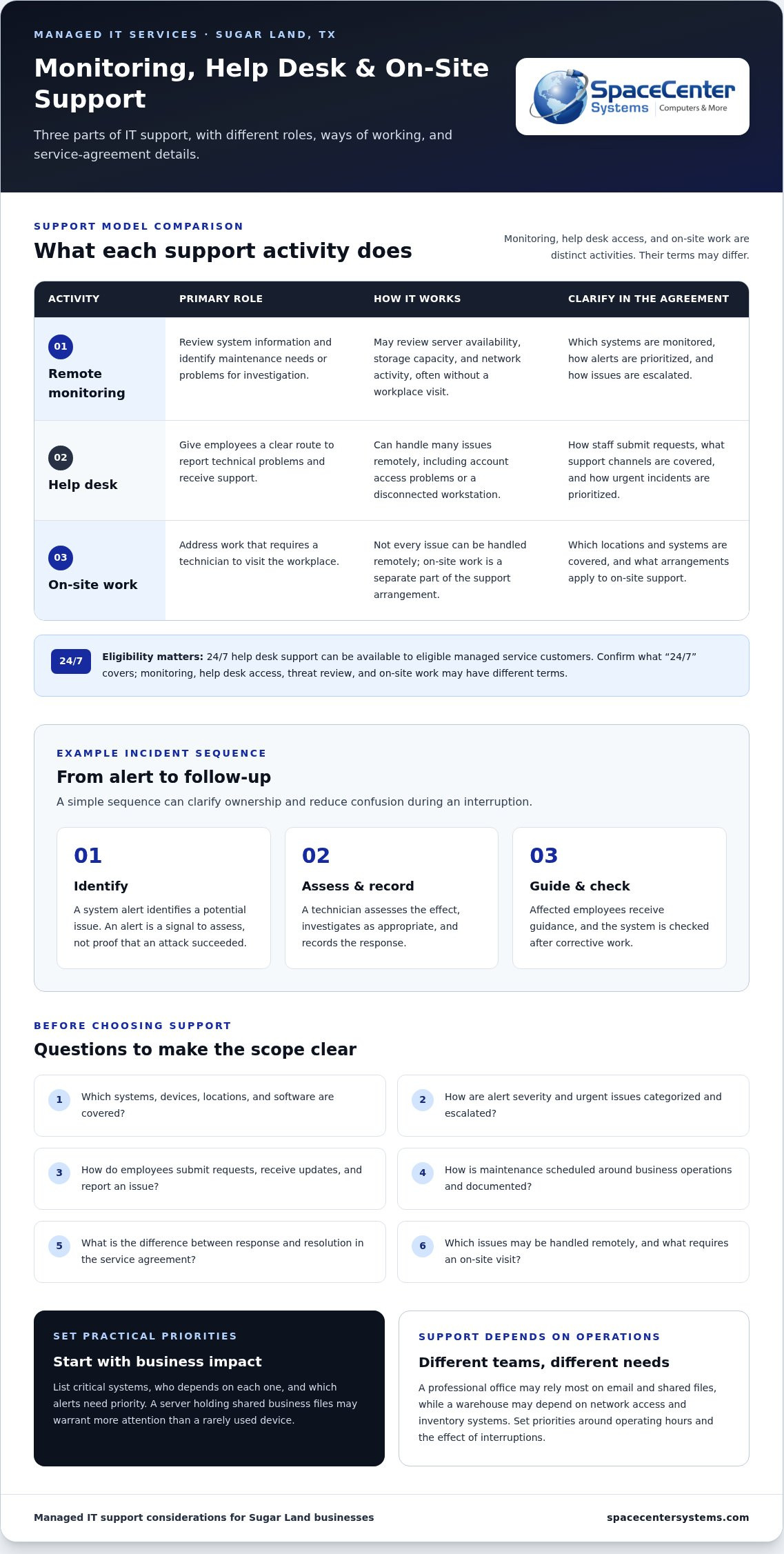
Monitoring and help desk support address different parts of an IT problem: systems generate alerts, and people need help resolving issues. For eligible managed service customers, 24/7 help desk support can provide a contact point outside regular business hours.
Remote Monitoring and Server Management
Remote monitoring reviews information such as server availability, storage capacity, and network activity. Managed IT support uses this information to identify maintenance needs and investigate problems, often without a technician visiting the workplace. Start by listing critical systems, noting who depends on each one, and deciding which alerts need priority. A server holding shared business files, for example, may warrant more attention than a rarely used device.
Threat Detection and Maintenance
Monitoring can help surface unusual activity or system changes that warrant investigation. A threat alert is a signal to assess, not proof that an attack succeeded; staff need a defined process for reviewing it, documenting findings, and taking appropriate action. Remote maintenance can also address routine system tasks without an on-site visit. Ask how alert severity is categorized, how the support team escalates an issue, and how maintenance is coordinated with business operations.
Help Desk Support
A help desk gives employees a clear route for reporting technical problems, from account access issues to a disconnected workstation. For eligible managed service customers, 24/7 help desk support can matter when a disruption occurs outside normal office hours. Before service begins, document how staff submit requests, what information helps diagnose an issue, and how urgent incidents are prioritized. A useful report includes the affected user, device, business application, and time the problem began.
For Sugar Land businesses, support priorities depend on operating hours, critical systems, and the effect of interruptions. A professional office may rely most on email and shared files, while a warehouse may depend on network access and inventory systems. Identify which problems need prompt attention and which can wait for scheduled maintenance. A service agreement should specify covered systems, support channels, and escalation steps.
Review how monitoring and support work together by tracing a sample incident. First, a system alert identifies a potential issue. Next, a technician assesses its effect and records the response. Then, affected employees receive guidance and the system is checked after corrective work. This sequence helps clarify ownership and reduce confusion during an interruption. For details about local coverage, see IT support in Sugar Land.
When comparing managed IT services, ask for a plain explanation of what “24/7” covers. Monitoring, help desk access, threat review, and on-site work are distinct activities, and each may have different terms. Confirm how employees reach support, which systems are monitored, and how urgent events are escalated. Clear answers make it easier to judge whether the arrangement fits your business, without assuming every issue receives the same response or resolution time.
Managed IT support tailored to business size and needs
Before choosing managed IT support, define which systems need ongoing management, how requests should be prioritized, and how the work supports your operations. Also document ownership of accounts and records, responsibility for security decisions, and how issues affecting the business are escalated.
Response Times and Service Agreements
A service agreement should explain how support requests are received, categorized, and assigned. Check that it distinguishes response from resolution: acknowledging a ticket does not mean the underlying issue is fixed. Ask how urgent issues are identified, who receives updates, and how unresolved work is escalated. These details help businesses understand the support process and its scope.
Review the agreement against a real workflow. If employees cannot access a business application, for example, identify who reports the issue, what information they provide, and how progress is communicated. Confirm which devices, locations, and software are covered. Clear boundaries help businesses understand what managed IT support includes and where internal staff remain responsible.
Proactive Maintenance and Multi-Location Support
Proactive maintenance involves planned work to help prevent avoidable interruptions, such as reviewing system health, addressing known issues, and coordinating updates. Ask how maintenance is scheduled around business operations and how changes are documented. A retail office, warehouse, and professional firm may rely on different infrastructure, so support priorities should reflect each location’s essential systems.
If your business operates in Sugar Land and another community, map shared systems alongside each location’s specific needs. Decide who coordinates a site issue, how local staff report it, and how changes at one office are communicated to others. An up-to-date inventory of networks, devices, and business applications gives support teams a clearer picture across locations.
Financial firms should coordinate technology support with their internal compliance process. If a firm is addressing the FTC Safeguards Rule, its compliance lead can identify the security controls and records that need coordination with IT support. Define who maintains documentation, reports a suspected incident, and approves changes. This connects technical work with the firm’s oversight without treating a support agreement as a substitute for compliance advice.
Business size alone does not determine the right support model. A small organization with complex systems may need careful coordination, while a larger company may divide responsibilities between internal staff and outside support. List essential applications, recurring problems, and planned changes before discussing coverage. This inventory helps shape support around actual workflows rather than a generic device count.
Outsourcing can create gaps if access, responsibilities, or escalation paths are unclear. Document who controls administrator accounts, approves system changes, and receives incident updates. Decide how employees report problems and how business leaders are informed when an issue affects operations. As specialized IT service providers like ZANGAARD point out, establishing clear accountability early helps external support successfully handle its assigned technical work.
Cloud solutions and IT infrastructure
Moving business systems to the cloud changes where applications run and how employees access them. Before selecting cloud services, map each workload, its users and data, and its connections to other systems. This inventory helps a Houston business plan around actual needs instead of moving every application without review.
Start with a practical assessment. Identify the systems essential to daily operations, such as email, shared files, accounting software, or customer records. Note dependencies, including user accounts, internet access, and workplace devices. Then decide whether each workload belongs in the cloud, on local equipment, or in a mixed setup. This review helps plan migration work and identify security needs related to access and data protection.
Cloud services can support disaster recovery, but storing information remotely is not the same as restoring business operations. A recovery plan should identify what data is protected, who can access it, and how employees can resume work if a system becomes unavailable. A firm, for example, may need both its files and the application that uses them. Map dependencies, assign decision-making responsibility, and document the order for restoring essential systems.
Data recovery planning should include a restore process, not just a backup schedule. Practice retrieving a representative file or application so staff understand the steps. Record where restored data goes, who approves access, and how the business verifies that the information is usable. Cloud backups can help recover deleted or damaged data, while broader disaster recovery planning addresses the systems and workflows needed to continue operations.
Treat migration as a controlled sequence. First, inventory applications and identify data owners. Next, review access permissions and dependencies. Then move a suitable workload, test user access, and address issues before proceeding. Shared documents, for example, may require different preparation from a business application connected to local equipment. Record changes so employees can adapt and administrators have a reference for troubleshooting.
Cloud infrastructure also relies on dependable connections and careful access management. Remote employees may need secure access to the same files as office staff, while a business application may depend on a local network device. Document these needs before migration. Review who needs access, remove permissions that no longer match job duties, and plan how support staff can determine whether a problem involves the application, account, or network connection.
For businesses in Sugar Land and across Greater Houston, cloud design should reflect existing systems, work patterns, recovery priorities, and security needs. A clear workload inventory gives decision-makers a practical starting point for comparing cloud options and planning a migration suited to their operations.
Managed IT services for small and medium-sized businesses
Providers serving Sugar Land and nearby Houston areas include regional managed IT firms with coverage across Fort Bend County and Greater Houston. Compare each provider’s service area, remote support scope, and process for coordinating on-site work, rather than assuming every location receives the same support.
Small and medium-sized businesses can shape IT support around their workflows, existing infrastructure, and internal technical resources. List essential applications, employee devices, and recurring issues. A small professional office may prioritize email and file access, while a growing warehouse may depend on inventory systems and reliable wireless connections. This inventory helps establish practical support priorities.
Cybersecurity should fit the organization’s risks and daily routines. Review who can access business accounts, how departing employees lose access, and where staff report suspicious messages. A business handling customer records, for example, may prioritize account security and email protection. Documenting these responsibilities connects security practices with daily support rather than treating them as separate projects.
Business VoIP systems also affect day-to-day operations. Before changing phone service, map how calls move among reception, departments, and remote employees. Identify who needs individual extensions, shared call handling, or voicemail access. Then review how phones depend on the business network and internet connection. This planning helps prevent a service change from disrupting established customer communication.
Business goals should guide support priorities. If you plan to add employees, open an office, or adopt cloud applications, discuss those changes before they become urgent. A support plan can account for onboarding, access setup, device configuration, and network capacity. A technology inventory helps Sugar Land businesses connect these tasks with budgets and operating plans.
For local small-business IT services, distinguish routine support from project work. Ask what happens when a workstation fails, a network issue affects several employees, or a new application needs setup. Clarify who owns each task and how staff report the problem. These examples reveal whether the support approach matches the organization’s actual needs and internal capabilities.
When choosing managed IT support, compare service scope, communication practices, security responsibilities, and how support can adapt as your organization changes. Ask how technology recommendations connect to business goals and how planned work is documented. For Sugar Land businesses, SpaceCenter Systems can discuss remote troubleshooting and coordinate support around your locations and operating routines.
A measured review can help manage technology spending without overlooking business needs. Group current issues by their effect on operations, then separate urgent fixes from planned upgrades. Recurring call drops, for example, may need network troubleshooting, while an office move may require coordinated phone and connectivity changes. This gives owners a clearer basis for prioritizing work.
Data backups and network management
Backups protect business information, while network management helps employees reach the systems that use it. Reviewing both together can show Greater Houston businesses where a disruption could affect productivity.
Data Backup Services
A backup plan should specify which files and systems matter, where copies are stored, and who can restore them. A firm may need shared documents, accounting records, and application data to resume work after accidental deletion. Assign an owner to each data set, then document recovery steps and access permissions.
Test recovery by restoring a selected file or application and confirming it works as expected. Record how long the process takes, who approves access, and where recovered information belongs. A backup that has never been restored may not meet the business’s needs during an actual disruption.
Network Management
Network management covers the connections linking workstations, servers, wireless access points, and business applications. Keep an inventory of network equipment and note which departments depend on each connection. If staff lose access to a shared application, that map helps narrow the issue to a device, connection, or service instead of prompting unrelated changes.
Review recurring network problems alongside planned changes. A new wireless access point or office layout, for example, can affect how employees connect. Documenting network changes, device locations, and known issues gives support staff useful context and can reduce repeated troubleshooting.
Set backup priorities according to how employees work. A business that relies on shared project files may need those restored before less-used archives. List the applications that depend on each data set and identify who will verify restored information. This makes recovery planning a practical business process, not simply a storage decision.
Network performance can also affect backup activity. A large transfer may compete with everyday work if it uses the same connection. Review when backups run, which systems they include, and whether staff notice slower access during those periods. Adjusting schedules or network priorities can help balance data protection with daily operations.
In an office with guest Wi-Fi, employee devices, and business systems, separate network access by purpose. Document which users need internal resources and who manages those permissions. Clear network records help staff investigate unfamiliar connections and maintain appropriate access as employees or business needs change.
Review backup reports and network changes as part of regular technology planning. Track recurring failures, unresolved alerts, and systems added since the previous review. These records help decision-makers spot patterns, prioritize maintenance, and connect technology work with operational needs.
Discuss business backup and recovery needs
SpaceCenter Systems: Managed IT Services
SpaceCenter Systems brings managed IT support together with cybersecurity, cloud computing, and VoIP phone systems. Consider its managed IT services when recurring issues, disconnected systems, or planned growth make daily operations harder to manage. Start with your current infrastructure, essential applications, and the problems affecting staff most often. This context helps identify priorities suited to your business rather than assuming every organization has the same setup.
For Sugar Land businesses reviewing support options, SpaceCenter Systems can discuss managed IT services in relation to existing workflows and business priorities.
Contact SpaceCenter Systems about managed IT support
Set Your Next IT Priorities
If you’re evaluating managed IT services in Sugar Land, TX, first decide what better technology support should help your business achieve. Identify a goal, such as reducing work disruptions, strengthening security practices, or planning a cloud transition. Bring your priorities and operational challenges to SpaceCenter Systems for an IT assessment.
SpaceCenter Systems provides Managed IT Services, Cybersecurity, and Cloud Computing. Discuss these services in relation to your existing environment and the outcomes your organization needs. A focused conversation can clarify which issues deserve attention first and what information will guide the next decision.
Thoughtful planning gives your team a practical foundation for technology decisions. Start with the needs that matter most to your business, then schedule an IT assessment with SpaceCenter Systems to discuss the next steps.
Your business can move forward with a clearer view of its technology priorities.
Frequently Asked Questions
Do you offer responsive support and on-site response in Sugar Land?
Yes. SpaceCenter Systems provides remote and on-site IT support for business technology issues in Sugar Land. When reporting a problem, describe the affected location, business system, and work employees cannot complete. Note whether the issue affects one workstation or a shared system. This context helps support staff understand its scope and choose an appropriate troubleshooting approach.
Want a Smarter Technology Partner?
Start with a specific business objective, such as preparing for an office move or reviewing a planned technology upgrade. SpaceCenter Systems offers IT assessments and project consultations to help businesses examine their needs. Before the discussion, gather an equipment inventory, upcoming changes, and questions from employees. This keeps the conversation focused and connects technology decisions to operational priorities.
What does an engagement with a Sugar Land managed IT services provider typically cost?
There is no single standard cost for every business engagement. Scope depends on the systems and work involved, such as ongoing support, a cloud project, or a network change. To frame a useful quote, distinguish recurring support from one-time projects and describe the outcomes you need. This clarifies what work belongs in the proposed engagement instead of relying on a generic estimate.
What industries do you serve in Sugar Land?
SpaceCenter Systems serves healthcare, manufacturing, small businesses, legal and finance organizations, education, nonprofits, and general enterprises. Each setting has its own operational priorities. A property manager, for example, may need technology support across offices and shared facilities, while a healthcare practice may focus on clinical operations. Describe your workflows and critical systems so support discussions reflect how your team works.
What managed IT services do Sugar Land TX providers offer?
Managed IT support can include network monitoring, help desk assistance, infrastructure management, cybersecurity, cloud computing, and technology consulting. SpaceCenter Systems provides managed IT services alongside cybersecurity and cloud computing. Identify which business systems need ongoing management and whether upcoming projects require separate planning. This helps distinguish routine support from specific implementation work.
What do managed IT services cost in Sugar Land, TX per user or device?
Pricing may be based on users, devices, or the scope of services included. Before comparing a per-user figure with a per-device figure, clarify which equipment and responsibilities each covers. A workstation, shared server, and network device may receive different management. Review the proposed scope, note exclusions, and understand how staffing changes or new equipment could affect the agreement.
Do local managed service providers offer 24/7 support and guaranteed response times?
Support hours and response commitments depend on the specific service agreement. SpaceCenter Systems provides 24/7 support for eligible managed service customers, but that does not mean every issue has a guaranteed resolution time. Review how the agreement defines support access, urgency, and response expectations. A written description helps your team know which process to follow when an issue arises outside regular business hours.
What cybersecurity, backup, and disaster recovery services are included?
SpaceCenter Systems offers cybersecurity, backup, disaster recovery, and business continuity services. Their scope depends on the systems and business needs involved. A review can identify essential data, who needs access, and which business functions depend on it. Clarifying these priorities helps align security and recovery planning with your organization’s operations and responsibilities.
Find our answers helpful?
Add SpaceCenter Systems as a preferred source on Google to see more of our articles and answers in your search results.