


Imagine a Tuesday morning at your office near Sugar Land Town Square where a local team member can’t find the latest project version while a remote contractor is locked out of the server. This fragmented communication often leads to missed deadlines and rising frustration. Implementing Google Workspace for business Sugar Land transforms these technical headaches into a unified digital headquarters. You probably already know that keeping your team on the same page is the hardest part of scaling a small business in the Houston area.
We understand that the fear of losing years of critical data during a move to the cloud is a valid concern for any established owner. This guide provides a clear roadmap to transition your operations to a secure, cloud-based environment that drives collaboration while reducing your IT overhead. You will discover the latest 2026 pricing structures, explore AI-powered security features like Gemini integration, and learn the specific steps to achieve a seamless migration with expert local support. By the end, you’ll see how to replace high server costs with a predictable, scalable office that works as hard as you do.
Key Takeaways
- Learn how real-time collaboration in Docs and Sheets eliminates version control errors and keeps your team synchronized across Sugar Land and Houston.
- Understand the enterprise-grade security features that protect your sensitive business data from phishing and unauthorized access.
- Discover why adopting Google Workspace for business Sugar Land reduces IT overhead by replacing expensive on-premise servers with a scalable cloud environment.
- Follow a proven 5-step migration roadmap to avoid common DIY pitfalls like broken links, lost emails, and costly operational downtime.
- Find out how a managed cloud approach from a local IT partner ensures your digital office remains stable and fully supported as you grow.
What is Google Workspace for Business & Why Sugar Land Companies are Switching
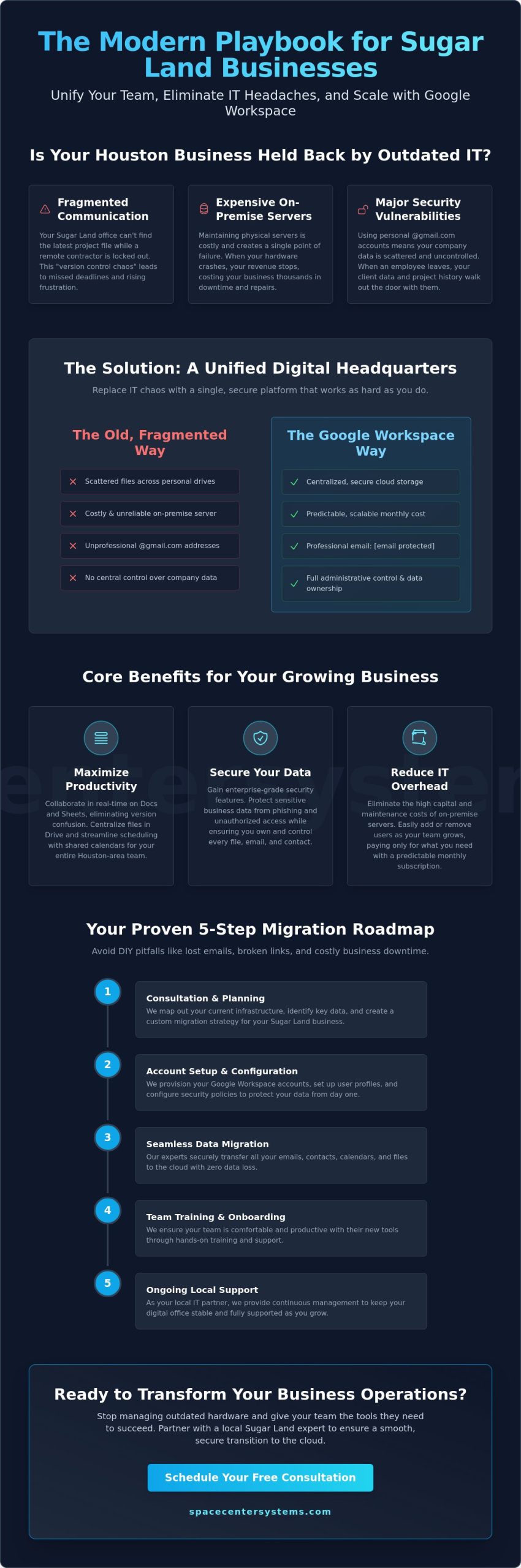
Business owners along the Southwest Freeway corridor are moving away from traditional, desk-bound operations. They need tools that work as fast as the local economy. To understand this shift, we first need to look at What is Google Workspace. It isn’t just a collection of apps. It’s a unified, cloud-hosted environment that brings your email, documents, and video conferencing into one secure space. Many firms in the region previously relied on fragmented legacy systems or physical servers that required constant maintenance. Adopting Google Workspace for business Sugar Land solves these issues by creating a single source of truth for your entire team, regardless of where they are working.
The pain of using consumer-grade accounts for professional work is real. When your staff uses personal accounts, your company data is scattered across platforms you don’t control. This creates a massive security vulnerability. If a team member leaves, they take their files and client history with them. Transitioning to a professional suite ensures that every byte of data belongs to your business. It replaces the frustration of “where is that file?” with a streamlined, searchable database that keeps your operations running smoothly.
The Difference Between Personal Gmail and Business Workspace
Using an @gmail.com address for your company creates a professional hurdle. It lacks the credibility your clients in the Greater Houston area expect. Business Workspace provides custom addresses like name@yourcompany.com, which instantly builds trust. Beyond appearances, the real value lies in administrative control. You gain the power to manage user access, enforce security policies, and own all company data. You also receive significantly more storage capacity. This ensures your team never hits a wall during a critical project due to a full inbox or drive.
Why Local Businesses in Sugar Land are Migrating
Sugar Land businesses are scaling quickly. Maintaining physical servers in a local office is expensive and creates a single point of failure. If your hardware crashes, your revenue stops. Cloud migration offers a more stable alternative. It provides several key benefits for local firms:
- Scalability: Easily add new users as your team grows without buying new hardware.
- Cost Reduction: Eliminate the high costs of maintaining and cooling on-premise server rooms.
- Hybrid Flexibility: Allow staff to collaborate from a home office in Missouri City or a coffee shop in Sugar Land Town Square with the same efficiency as being at their desk.
If you’re tired of managing outdated hardware and want to stabilize your digital infrastructure, we can help. Contact us today to schedule a consultation at our Sugar Land office to discuss your migration path.
Maximizing Productivity: Core Features for Your Sugar Land Team
Efficiency in a modern office isn’t just about having a fast internet connection. It’s about the tools that allow your staff to work together without friction. Many local businesses struggle with “version control” issues, where multiple copies of the same spreadsheet are floating around in messy email threads. By implementing Google Workspace for business Sugar Land, you eliminate this confusion entirely. Docs, Sheets, and Slides allow your team to edit the same file simultaneously. You can see changes in real-time, leave comments for colleagues, and never worry about which version is the most current.
Centralizing your resources is essential when your team is split between a home office in Greatwood and your main headquarters. Google Drive provides secure, centralized file storage that everyone can access instantly. No more waiting for a colleague to email a large PDF. Google Meet also provides professional video conferencing that replaces the need for high-travel costs between regional branches. Additionally, shared calendars streamline scheduling across different locations. If you need to coordinate a meeting between your Sugar Land and Houston offices, you can see everyone’s availability in one view. This simple shift reduces the back-and-forth of scheduling emails—a level of organizational efficiency also prioritized by institutions like Bright Future Private School to manage their daily schedules and resources—allowing your leaders to focus on high-value tasks.
Streamlining Communication with Gmail and Chat
Email clutter is a major productivity killer. Google Chat provides a faster way for internal teams to communicate without filling up inboxes. It’s perfect for quick questions or project updates that don’t require a formal email. Within Gmail, the advanced search capabilities allow you to find mission-critical data in seconds. You can search by sender, date, or even specific keywords within attachments. This level of organization ensures that important client details never fall through the cracks in your daily workflow.
The Business Impact: Reducing Downtime and Friction
Downtime is more than an inconvenience; it’s a direct threat to your revenue. Google Workspace offers a 99.9% uptime guarantee, ensuring your tools are available whenever you need them. For a local firm, this stability can be transformative. Implementing Google Workspace for business Sugar Land helped one professional services office recently save over 10 hours a week by moving administrative tasks to the cloud. They replaced manual filing and redundant data entry with automated workflows and shared folders. As you look to secure your digital assets, it’s also wise to review the Cybersecurity for Small Businesses guidelines provided by the FTC to ensure your team follows best practices.
The final outcome is a more agile team that responds to clients faster. When your technical friction disappears, your staff can dedicate their energy to serving customers and growing the business. If you want to see how these tools can fit your specific workflow, you can explore our IT consulting services to find the right configuration for your office.
Securing Your Data: Google Workspace Cybersecurity for Small Businesses
The most common objection we hear from owners in the region is a simple question: “Is my data actually safe in the cloud?” This concern is valid. When you move your operations from a physical server in your office to a digital environment, you’re trusting a third party with your life’s work. However, Google Workspace for business Sugar Land provides enterprise-grade security that most small firms could never afford to build on their own. By leveraging Google’s global infrastructure, you gain a level of protection that individual on-premise servers simply cannot match. Your data stays yours, and it remains encrypted both while it’s sitting in storage and while it’s being sent between team members.
One of the most effective tools in your arsenal is 2-Step Verification (2FA). This security layer requires a second form of identification, such as a code sent to a mobile device, before granting access to an account. It’s a simple step that stops unauthorized logins even if a password is compromised. Recent data shows that 55% of AI inputs now contain sensitive information, which makes these safeguards more critical than ever. For a deeper look at protecting your digital assets, you can review our comprehensive guide on Cybersecurity for small business Houston. Following established FTC cybersecurity guidelines further ensures your team remains resilient against evolving threats like phishing and ransomware.
Data Protection and Compliance Standards
If your business operates in the medical or legal sectors, you must meet strict industry regulations. Google Workspace supports HIPAA and GDPR compliance, providing the administrative controls needed to protect sensitive client records. Tools like Google Vault allow for eDiscovery and data retention. This means you can preserve important emails and files for legal purposes even if they’re deleted from a user’s active inbox. Proactive threat detection also works in the background, using AI to identify and block suspicious activity before it reaches your staff.
Managing Mobile Devices Locally
Your data is only as secure as the devices accessing it. Endpoint management allows you to secure company information on employee phones without intruding on their personal privacy. Consider a real-world scenario: an employee loses their smartphone while visiting First Colony Mall. Without proper controls, your proprietary information is at risk. With Google’s mobile management, you can perform a remote wipe of the business data on that specific device. This capability provides peace of mind for owners, knowing that a lost laptop or phone won’t lead to a devastating data breach. If you’re ready to harden your defenses, contact our Sugar Land office to discuss a security audit.
The Migration Process: 5 Steps to a Seamless Transition
Attempting a DIY migration to Google Workspace for business Sugar Land is a high-risk move for any established company. While the platform itself is user-friendly, the technical transition of years of data is demanding. We’ve seen many local firms lose access to critical client emails or find themselves with broken document links because they tried to handle the move in-house. These glitches don’t just cause frustration; they lead to actual revenue loss and operational downtime that your business can’t afford. A structured approach is the only way to ensure your data remains intact and your team stays productive.
Our proven migration process follows five specific steps to protect your operations. First, we perform a complete audit of your existing email and data structure. This ensures we know exactly what needs to move, from old archives to current project folders. Second, we help you choose the right Google Workspace edition based on your seat count and storage needs. Third, we secure a full data backup before the actual move begins. This acts as a safety net for your peace of mind. Fourth, we execute the migration using zero-downtime techniques. This means your staff can keep working in their old environment while the data syncs to the cloud in the background. Finally, we provide employee training to ensure high adoption rates and a smooth transition for everyone in the office.
Common Migration Pitfalls to Avoid
Incomplete DNS settings are a frequent cause of failed migrations. If these records aren’t updated correctly, emails from your customers in Houston might bounce back as undeliverable. Another major risk is failing to migrate legacy folder permissions accurately. This can lead to sensitive company data being accessible to the wrong people or staff being unable to open the files they need for their daily tasks. These technical errors often result in a “glitch” that halts your workflow and costs you money in lost billable hours.
Why Local IT Support is Critical for Sugar Land Businesses
Having Sugar Land IT services nearby is a significant advantage during a cloud transition. Implementing Google Workspace for business Sugar Land should be a growth milestone, not a source of stress. We provide on-site support for complex network integrations that a remote help desk simply cannot handle. We ensure your local printers, scanners, and specialized software all communicate perfectly with your new cloud environment. The outcome is a professional setup that works correctly from the very first day.
If you’re ready to modernize your office without the technical headaches, schedule an IT consulting session with our local team today to plan your move.
Partner with SpaceCenter Systems for Your Google Workspace Setup
SpaceCenter Systems has served as a dependable IT pillar for the local community since 1995. We’ve grown alongside the regional economy, helping businesses from the historic district to the latest developments along Highway 6 navigate three decades of technical evolution. We understand that for a business owner, technology should be a silent partner that supports growth, not a source of constant frustration. Implementing Google Workspace for business Sugar Land is a significant step toward modernizing your office, but the software is only as effective as the team managing it. Our seasoned experts provide the quiet confidence and technical authority you need to ensure your transition is successful and your data remains secure.
We take a “Managed Cloud” approach that sets us apart from faceless software directories. We don’t just sell you a license and leave you to figure out the settings. Our team manages the entire environment to ensure it aligns with your specific operational goals. This includes integrating your suite with our broader Cloud Computing Services in Houston to create a seamless digital infrastructure. The SpaceCenter guarantee is simple: we provide mission-critical support that is professional, reliable, and rooted in our commitment to the success of our peers in the Sugar Land area.
Comprehensive Support Beyond the Software
A truly unified office requires more than just a shared drive. We specialize in connecting your cloud tools with other essential services to improve your team’s efficiency. For example, we can integrate your workspace with modern Business VoIP Systems to ensure your communication remains crystal clear whether you are in Pearland or at your main desk. Our managed services also include ongoing network monitoring. This proactive oversight prevents the minor glitches that often snowball into major downtime for firms. We combine this high-end technology with a neighborly, approachable warmth that reflects our deep roots in the local community.
Take the Next Step for Your Sugar Land Business
It’s time to move from technical overwhelm to operational stability. You’ve seen how the right cloud environment can reduce IT overhead, improve collaboration, and protect your proprietary information from evolving cyber threats. The transition to a unified digital office doesn’t have to be a burden when you have a local partner to handle the technical heavy lifting. We invite you to schedule an IT audit to assess your current infrastructure and determine your cloud readiness. This professional assessment identifies potential risks and creates a clear path forward for your team. Don’t let outdated hardware hold your business back any longer. Schedule your Google Workspace consultation today and experience a more personalized level of technical support.
Secure Your Digital Future in Sugar Land
Modernizing your office with Google Workspace for business Sugar Land is more than a software upgrade; it’s a strategic shift toward operational stability. You’ve seen how centralizing your files and securing your communication can eliminate the friction that holds back growing teams. By replacing outdated hardware with a scalable cloud environment, you protect your revenue from unexpected downtime and security vulnerabilities. This transition allows your staff to focus on serving clients across the Greater Houston area instead of troubleshooting technical errors.
SpaceCenter Systems brings over 25 years of local Houston IT experience to every migration. We specialize in the unique growth challenges faced by businesses with 5 to 50 employees, offering 24/7 proactive helpdesk support to ensure your digital office never stops. Our neighborly approach ensures you have a local partner invested in your long-term success. Ready to modernize your team? Schedule your Sugar Land Google Workspace consultation with SpaceCenter Systems.
Frequently Asked Questions
How much does Google Workspace for business cost in Sugar Land?
Google Workspace offers tiered pricing based on the specific needs of your organization. As of June 2026, the Business Starter plan is $7 per user per month when billed annually, while the Business Standard plan is $14 per user per month. For larger teams requiring advanced security and more storage, the Business Plus plan is available at $22 per user per month. Selecting the correct tier for your Google Workspace for business Sugar Land setup ensures you only pay for the features and storage your team actually uses.
Can I keep my current email address when switching to Google Workspace?
Yes, you can maintain your professional identity by using your existing domain name. During the migration, we configure your settings so that name@yourcompany.com flows directly into your new Gmail inbox. This process is handled through DNS updates that redirect your mail traffic without changing your actual address. It ensures that your clients never notice a change in how they contact you while you gain the benefits of a more stable platform.
Is Google Workspace better than Microsoft 365 for small businesses?
The choice between these platforms depends on your team’s specific workflow and software requirements. Google Workspace is often the preferred choice for businesses that value real-time, browser-based collaboration and a more intuitive user interface. Microsoft 365 remains a strong contender for firms that rely heavily on desktop-based applications or complex spreadsheet functions. We recommend a professional audit of your current operations to determine which suite provides the most stability and efficiency for your staff.
How long does it take to migrate a business to Google Workspace?
A typical migration for a business with 5 to 50 employees generally takes between one and three weeks. This timeline includes the initial data audit, the technical transfer of files and emails, and final staff training. Most of the heavy lifting occurs in the background or over a weekend to prevent any impact on your daily operations. Our focus is on a zero-downtime transition so your revenue isn’t interrupted by technical delays.
Do I need a local IT company to set up Google Workspace?
While basic setup is possible on your own, a local IT partner ensures your environment is secure and correctly integrated with your existing network. We handle the critical security configurations, such as email authentication records, that prevent your messages from ending up in a client’s spam folder. Having a Sugar Land team available also means you receive on-site support for hardware issues that remote help desks cannot physically address.
Is my data backed up automatically in Google Workspace?
Google provides excellent redundancy to prevent data loss from their hardware failures, but they don’t offer a comprehensive “point-in-time” backup for user errors. If an employee accidentally deletes a critical folder and the trash is emptied, that data could be lost forever. We recommend adding a managed backup service to your Google Workspace for business Sugar Land environment. This provides an extra layer of stability, allowing you to recover any file from any date.
Can I use Google Workspace offline if my Sugar Land office internet goes down?
Yes, you can enable offline mode for your most important documents, spreadsheets, and emails. This allows your team to stay productive even during local internet outages or while traveling through areas with poor connectivity. Any changes made while offline will automatically sync to the cloud the moment your device reconnects to the web. This ensures that a temporary connection issue doesn’t bring your entire project to a standstill.
How does Google Workspace help with remote work for Houston teams?
Google Workspace acts as a unified digital office that follows your team wherever they go. Whether a staff member is working from a home office in Missouri City or meeting a client in downtown Houston, they have instant access to the same files and communication tools as their colleagues. This eliminates the need for expensive and often unreliable VPNs. It creates a more agile business environment where your team can collaborate effectively from any location.