

For small businesses, cybersecurity services in Houston should connect threat monitoring, incident response, encryption, and access controls to protect business systems and revenue. Managed cybersecurity can help identify suspicious activity, limit access to sensitive information, and coordinate a response when a threat appears. The right protections depend on the systems your business uses and the information it handles.
Strong security doesn’t necessarily require a large in-house IT team. Clear procedures and well-managed safeguards can help smaller organizations reduce exposure without making everyday work harder. Encryption helps keep data unreadable to unauthorized users, while access controls limit who can reach specific accounts, devices, and files.
This guide explains what managed cybersecurity can include, how threat response works, and how safeguards fit together. You’ll learn what to consider when choosing support for a Houston-area business, from protecting employee accounts to planning recovery after an incident. The aim is to make security decisions practical and help keep operations moving while protecting sensitive business information.
Key Takeaways
- Map the devices, accounts, networks, and cloud tools your business relies on to spot security gaps.
- Plan how your team will identify, contain, and recover from a cybersecurity incident.
- Use encryption and role-based access to reduce unnecessary exposure of sensitive business data.
- Prioritize safeguards that fit your organization’s systems, information, and available resources.
- Consider managed IT and cybersecurity support when security tasks compete with the work of running your business.
What does a managed cybersecurity service actually include?
Managed security brings together safeguards for devices, user accounts, networks, and cloud systems. A useful assessment connects each control to the business data and operations it protects.
Endpoint, Identity, and Cloud Security
Endpoint security covers business laptops, desktops, and servers, where malicious files or unpatched software can create risk. Identity controls protect employee accounts through measures such as multifactor authentication, role-based access, and prompt removal of former users. Cloud security reviews account permissions, data sharing, and configuration in platforms such as Microsoft 365 or Azure. For organizations handling protected health information, HIPAA applies, according to the U.S. Department of Health and Human Services.
Managed Security and SOC Coverage
Managed security services coordinate monitoring across systems and help triage alerts, investigate suspicious activity, and guide containment. A security operations center, or SOC, can provide 24/7 coverage when that monitoring is part of the service arrangement. Ask how alerts are prioritized, who receives them, and how escalation works. For example, a login from an unfamiliar location may require a different response from a routine software warning.
Security Assessments and Penetration Testing
A security assessment reviews assets, configurations, access practices, and existing protections to identify weaknesses. Penetration testing goes further by safely attempting to exploit selected vulnerabilities within an agreed scope. Findings should distinguish urgent exposures from lower-priority improvements and explain their effect on business systems. Ask what was tested, what evidence supports each finding, and how retesting will confirm that issues have been addressed.
Posture Remediation and Network Protection
A security posture assessment turns findings into a prioritized remediation plan. Actions might include closing unused accounts, correcting cloud permissions, updating vulnerable software, or strengthening backup and disaster recovery procedures. Network security can include firewalls, secure Wi-Fi configurations, and separation between business systems and guest access, often enhanced by solutions from providers like Lionic for application visibility and web content filtering. Structured cabling supports dependable connections, while labeled ports and restricted access to network equipment make physical changes easier to manage and review.
Use these steps to make the assessment practical:
- List essential devices, cloud accounts, business applications, and data stores.
- Rank findings by business impact, exposure, and the systems affected.
- Assign an owner and completion target to each remediation item.
- For Houston business technology, map network devices and cabling to the areas and systems they serve.
24/7 Threat monitoring and incident response
Continuous monitoring can surface suspicious activity outside normal business hours. Its value depends on clear alert priorities, assigned responders, and practiced containment steps.
Proactive Threat Detection
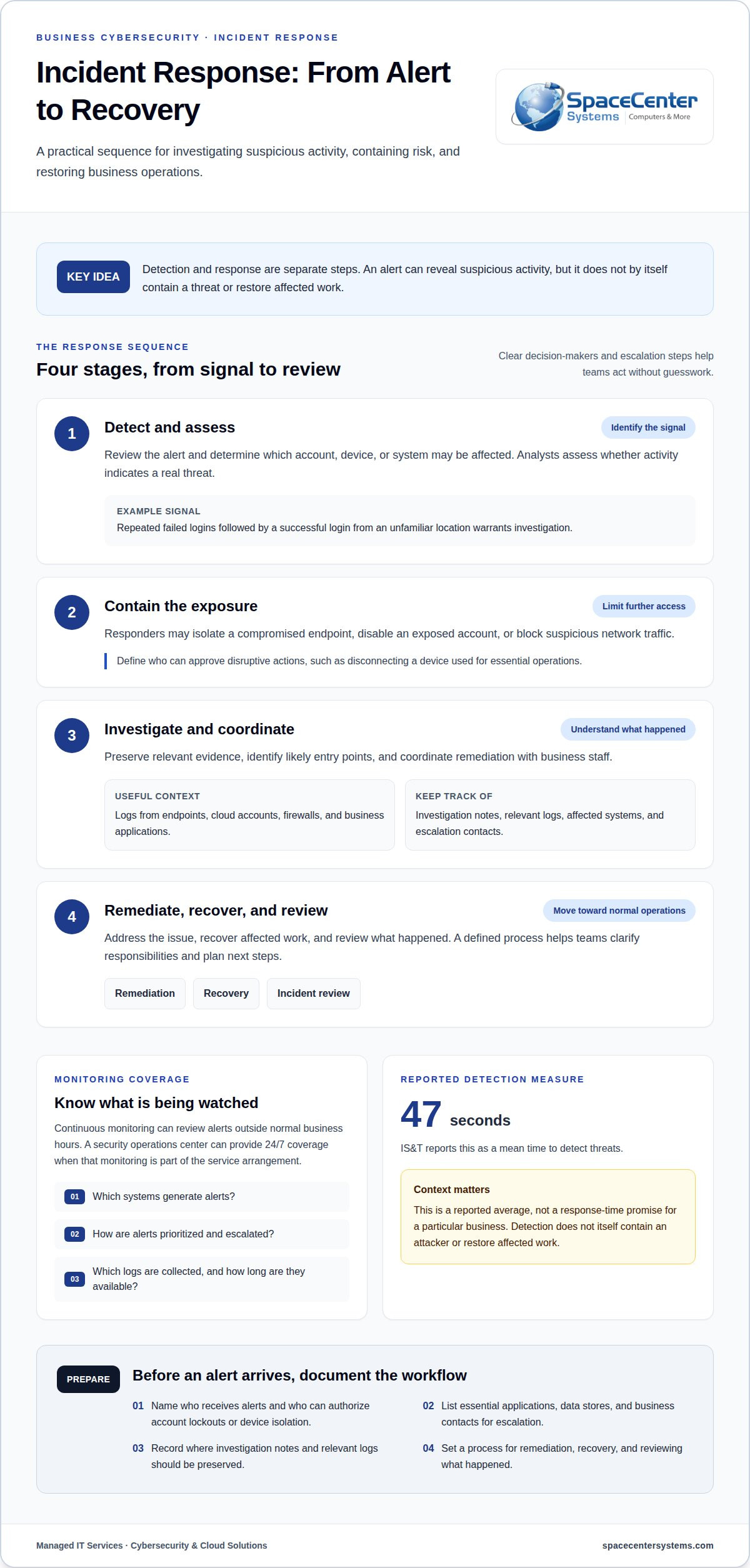
Proactive monitoring looks for warning signs before they become a confirmed incident. For example, repeated failed logins followed by an unfamiliar successful login warrant investigation. Detection tools compare activity with established patterns, and analysts assess whether an alert signals a real threat. Ask which systems generate alerts, how suspicious activity is prioritized, and who receives notifications that require business action.
Continuous Threat Monitoring
Twenty-four-hour monitoring can review alerts when employees are away, including overnight or during holidays. Log management brings records from endpoints, cloud accounts, firewalls, and business applications into a searchable view. That context helps connect events, such as a new account login followed by unusual file access. Clarify which logs are collected, how long they remain available, and how the response team escalates urgent findings.
Real-Time Incident Response
During an incident, responders first assess the affected account, device, or system. They may isolate a compromised endpoint, disable an exposed account, or block suspicious network traffic. Then they preserve relevant evidence, identify likely entry points, and coordinate remediation with business staff. A defined escalation path clarifies who approves disruptive actions, such as disconnecting a device used for essential operations.
Detection speed matters, but one measure cannot describe every environment. IS&T reports a 47-second mean time to detect threats. That figure is an average, not a response-time promise for a particular business. Review detection and response as separate steps: spotting an alert does not itself contain an attacker or restore affected work.
Before coverage begins, document an incident workflow that names decision-makers and priority systems. Include these practical details:
- Identify who receives alerts and who can authorize account lockouts or device isolation.
- List essential applications, data stores, and business contacts for escalation.
- Record where investigation notes and relevant logs should be preserved.
- Set a process for remediation, recovery, and reviewing what happened.
For Houston businesses assessing coverage, compare monitoring scope, escalation steps, and incident responsibilities. Clear network monitoring practices can help teams understand which systems produce alerts and how those signals support investigation.
Data encryption and access controls
Encryption and access controls protect information at different points in its lifecycle. Encryption makes data unreadable without the required key, while access controls determine who can open, change, or share it. Together, these safeguards can reduce exposure if a device is lost, an account is compromised, or an employee accesses information outside their role.
Consider a Houston professional office that stores customer files in cloud applications and sends invoices by email. Encryption can protect data as it moves between systems and when it is stored on supported devices or services. Access permissions should limit financial records to employees who need them. Review the actual sharing settings: an encrypted file can still be exposed through an account with excessive permissions.
Use a practical access review: identify sensitive data, assign a business owner, and map each role to the access it needs. Require stronger sign-in protections for administrators and accounts that can change payment details. Remove access promptly when responsibilities change or someone leaves. Replace shared accounts with individually assigned accounts where possible, so activity can be tied to a responsible user.
Customer trust depends on careful handling as well as technical controls. A clear process for approving access, reviewing file shares, and reporting accidental disclosure helps employees respond consistently. For example, if a staff member sends a customer spreadsheet to the wrong recipient, they should report it promptly through a defined incident response channel. A timely internal report can help contain further sharing and assess the exposure.
Data loss prevention, or DLP, helps identify or restrict risky movement of sensitive information. Depending on the tools and policies in use, controls can flag a file sent to a personal email account or copied to removable media. Start by defining what information needs protection, such as customer records or payroll files. Then tune alerts and restrictions to support legitimate work without unnecessarily blocking routine operations.
Backups and disaster recovery address a different risk: data may become unavailable, corrupted, or deleted even when access is controlled. Keep backup access separate from everyday user accounts, and document who can restore critical files. A recovery plan should identify the systems needed to resume work, the people responsible for decisions, and the order for restoring data. Disaster recovery planning helps turn those decisions into an organized process.
Test recovery by restoring selected files and confirming they open correctly. A backup that cannot be restored won’t support business continuity. Record the date, files tested, results, and any corrective action. If ransomware encrypts shared folders, isolate affected systems before restoring clean data. Recovery should follow investigation and remediation, not simply reconnect compromised devices.
- Review permissions for sensitive folders and cloud applications.
- Protect backup accounts with separate access controls.
- Test file restoration and document the outcome.
Managed cybersecurity services for Houston businesses
Managed cybersecurity helps an organization assign security work, coordinate technology changes, and connect risk decisions to business operations. The right scope depends on the systems, data, clients, and internal responsibilities involved.
What cybersecurity compliance services are available in Houston for HIPAA, PCI DSS, and CMMC? Support can include assessing controls, organizing documentation, and prioritizing remediation against relevant HIPAA, PCI DSS, or CMMC requirements. The appropriate scope depends on the organization’s activities, data, and contractual obligations.
How much do cybersecurity services cost in Houston? Cost depends on the systems covered, security tools, monitoring scope, support needs, and remediation work, with pricing provided after a quote request.
What cybersecurity services do Houston companies offer? Services can range from security program planning and policy development to ongoing technical administration and incident support. Some engagements focus on a defined project, such as reviewing a cloud environment; others address continuing operational needs. Compare the work included, who owns each task, and how progress is reported.
Are there Houston-specific cybersecurity regulations, resources, or incident reporting requirements? Texas firms should track obligations under the Texas Data Privacy and Security Act. Reporting considerations depend on the incident and information involved, so document internal escalation, preserve relevant records, and involve appropriate legal counsel or specialized legal support providers like trustpoint.one when shaping a response.
Cloud Migration and Microsoft 365 Management
Cloud migration planning should account for application dependencies, user access, and how staff complete daily work. For Microsoft 365, map business processes that rely on email, shared documents, and collaboration before changing configurations. A phased rollout can help teams identify workflow issues early and coordinate training, permissions, and support around the transition.
Privileged Access and Zero Trust
Privileged access management gives administrators controlled accounts for sensitive configuration changes. Keep routine work separate from administrative tasks, and record who approves elevated access. A zero-trust approach evaluates access requests in context instead of treating a network connection alone as proof of trust. Documenting exceptions helps managers understand why a person or system received access.
Managed IT and Help Desk Support
Managed IT and helpdesk support connect security processes to employees’ everyday needs. A staff member who receives a suspicious message should know how to report it without forwarding it widely or attempting an investigation. Clear reporting channels, documented ownership, and follow-up communication help employees understand what to do and where to direct questions.
When reviewing managed cybersecurity services, examine the service scope, division of responsibilities, and reporting format. Houston businesses should also clarify how security work coordinates with existing IT staff and software vendors. A written responsibility map helps prevent tasks from being overlooked during changes, staff transitions, or incidents that require several teams to work together.
Cybersecurity services for small and mid-sized businesses
Small businesses need security that fits their actual risks, systems, and staffing. A practical program starts by identifying critical operations, the information they handle, and the people responsible for security decisions. This focus helps an organization direct limited time toward detection, prevention, and recovery rather than adopting enterprise controls without a clear business purpose.
Cyberattacks affect smaller organizations too. Small and medium-sized businesses make up 65% of cyberattack victims. In reported findings, 69% have not identified cybersecurity threats, 43% lack a recovery plan for an incident, and 57% have not trained all users or employees. These figures point to concrete gaps: identify likely threats, define recovery actions, and make security guidance part of employee routines.
Start with an asset list that includes business email, customer records, payment systems, cloud applications, and devices used for work. For each item, name an owner and note what a disruption would prevent. A professional office might prioritize email and document access, while a distributor may rely more heavily on order processing and inventory systems. This business context helps set remediation priorities.
Then assign clear actions to responsible people:
- Choose who receives reports of suspicious messages, account activity, or lost devices.
- Record which systems must be restored first to resume essential operations.
- Schedule employee training around real examples, such as a fake invoice or password-reset message.
- Review access when an employee changes roles or leaves the organization.
Training should give staff a simple route to report concerns without trying to investigate alone. For example, an employee who notices an unexpected Microsoft 365 sign-in can report the alert through the organization’s established support channel. A defined process helps preserve useful details and directs the report to someone able to assess the account.
Compliance planning also needs to fit the business. A company handling protected health information should understand HIPAA-related safeguards, while a business processing card payments should consider PCI DSS obligations. A security assessment can compare current procedures with the organization’s data handling and operational needs. Regular assessments can surface gaps, guide remediation, and give leadership a clearer view of progress.
Small businesses can track progress through completed actions, such as identifying critical systems, documenting recovery steps, training staff, and resolving assessment findings. These measures connect security work to operational readiness without relying on broad claims. Make ownership explicit: assign each risk a next action, a responsible person, and a way to confirm completion.
SpaceCenter Systems: Managed IT Services
SpaceCenter Systems helps Houston-area businesses coordinate managed IT support with practical cybersecurity safeguards. Its Managed IT Services support organizations that need help maintaining business systems, addressing technology issues, and connecting security tasks to daily operations. Cybersecurity services include assessments and network security support, while Cloud Computing helps meet business needs involving cloud environments.
This support can be useful when staff lack time to manage security tasks, technology changes create new risks, or incident procedures need clearer ownership. For example, a business moving work into cloud applications can consider how access, support, and security fit together before making changes. Businesses using VoIP Phone Systems can also assess how voice technology fits within their wider technology environment.
To discuss managed IT and cybersecurity support for your business, visit SpaceCenter Systems’ Managed IT Services page.
Make your next security decision actionable
Choose one practical next step: identify the business system that would be hardest to operate without, then assign someone to review its safeguards. This focused start can turn cybersecurity planning into trackable work rather than a broad task that gets postponed. As needs change, revisit the plan when you add cloud tools, change employee access, or introduce new systems.
For businesses evaluating cybersecurity services in Houston, SpaceCenter Systems offers Managed IT Services, Cybersecurity, and Cloud Computing. These offerings connect security planning with the technology your organization relies on. Schedule an IT assessment to discuss your priorities and explore support aligned with your business needs.
A clear next step can make cybersecurity easier to manage. Build on it with a plan that supports your people, systems, and daily work.
Frequently Asked Questions
Why Work With a Houston Cybersecurity Company?
A Houston-area company can make planning easier when your business needs local coordination for technology projects. Consider how the provider communicates with your decision-makers, documents responsibilities, and works around your operating schedule. A local relationship may also help when a project involves business locations across Greater Houston. Geography alone isn’t enough, though. The support should fit your organization’s structure and make security decisions clear to the people responsible for operations.
Which Houston cybersecurity firms serve small and midsize businesses?
SpaceCenter Systems serves small businesses in Greater Houston. When comparing support, ask how the provider adapts its work for a smaller team with limited internal IT capacity. Clarify who handles planning, who communicates with employees, and how recommendations are prioritized. A small firm may need a different arrangement than an organization with dedicated security staff, so focus on workable responsibilities rather than company size alone.
How do Houston cybersecurity providers compare on services, pricing, and reviews?
Compare proposals by matching their assumptions and boundaries, not just their totals. Check whether each proposal identifies covered locations, business systems, exclusions, onboarding work, and how changes affect scope. In reviews, look for recurring comments about communication, follow-through, and clarity during difficult situations. A review can provide context, but it won’t show whether a provider’s responsibilities match your organization’s needs. Use a consistent comparison sheet to keep the decision grounded.
What managed security services are available in Houston?
Managed security arrangements differ in how much responsibility the provider assumes. Some focus on recommendations and periodic reviews; others include continuing operational work and defined escalation procedures. Ask how responsibilities are divided between your employees and the provider, how you receive status updates, and what routine reports include. These details clarify whether the arrangement supports your organization’s day-to-day process or mainly provides specialized help for selected tasks.
How can a Houston business assess and choose a cybersecurity provider?
Before selecting a provider, review the proposed working relationship as carefully as the technical scope. Confirm who owns business records created during security work, how access is removed when services end, and how your team receives documentation. Ask how the provider coordinates with existing software vendors or internal staff. Clear answers help prevent confusion during transitions and make it easier for your organization to retain control of its systems and decisions.
What cybersecurity services help Houston businesses respond to ransomware and data breaches?
Response planning should account for both locked files and possible data theft, since a ransomware event can involve more than disrupted access. Define how the business will handle affected vendors, customer communications, and operational workarounds while technical teams investigate. Assign someone to maintain an incident timeline and record key decisions. These steps help leadership coordinate business continuity alongside technical response, without assuming that restoring systems alone resolves every consequence.
Find our answers helpful?
Add SpaceCenter Systems as a preferred source on Google to see more of our articles and answers in your search results.