

A small business doesn’t need a large IT department to take customer data protection seriously. For small business cybersecurity in Friendswood, TX, start with reasonable safeguards for sensitive personal information, as required by Texas Business & Commerce Code Chapter 521. If a qualifying breach occurs, Texas businesses must notify affected individuals within 60 days of discovering it, according to the Texas Legislature.
Cybersecurity can feel complicated or costly to manage alongside daily operations. Practical steps can reduce avoidable risks: teach employees to spot suspicious messages, limit access to the information each person needs, and protect business devices and networks.
This guide explains how small businesses in Friendswood, Texas, can build those habits, secure business Wi-Fi and devices, and plan backups to support recovery. It also covers when stronger controls may be needed and how cybersecurity support can help address gaps without making security harder to manage.
Key Takeaways
- Build practical security habits by teaching employees how to recognize suspicious messages and report concerns promptly.
- Reduce unnecessary exposure by limiting each person’s access to the data and software their role requires.
- Keep business devices safer with consistent software updates, antivirus protection, and properly configured firewalls.
- Protect customer and payment information by securing workplace Wi-Fi and separating sensitive systems from everyday browsing.
- When security controls feel difficult to coordinate, cybersecurity and managed IT support can help bring them together into a workable plan.
Cybersecurity guidance for Texas small businesses
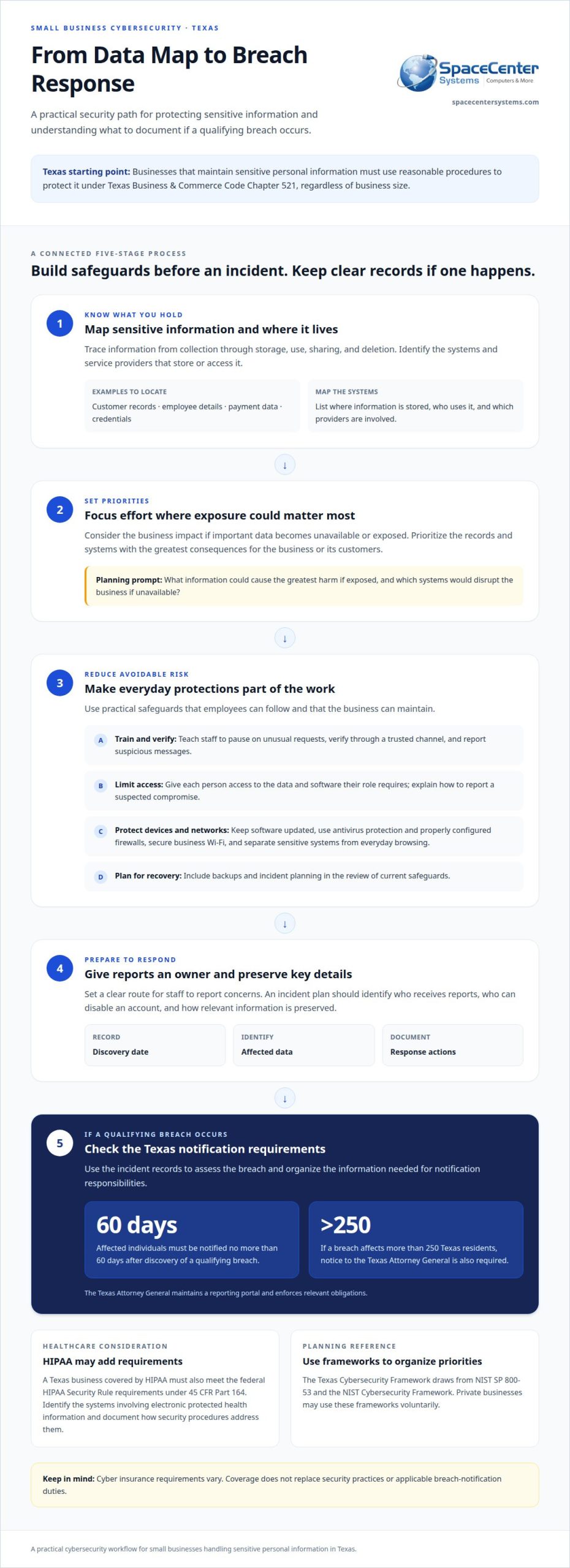
Cybersecurity planning begins with knowing what information your business holds and where it resides. Texas Business & Commerce Code Chapter 521 applies to anyone conducting business in Texas who maintains sensitive personal information, regardless of business size. It requires reasonable procedures to protect that information. Map customer records, employee details, payment data, and credentials to the systems that store or access them. This gives owners a concrete starting point instead of an overwhelming list of technical concerns.
A qualifying breach also creates notification responsibilities. Texas businesses must notify affected individuals no more than 60 days after discovering a qualifying breach, according to the Texas Legislature. A breach affecting more than 250 Texas residents also requires notice to the Texas Attorney General. The Attorney General maintains a reporting portal and enforces relevant obligations. Keeping incident records, including discovery dates, affected data, and response actions, helps organize the information needed to assess a breach.
Medical practices have additional requirements to consider. A Texas business covered by HIPAA must meet federal HIPAA Security Rule requirements under 45 CFR Part 164, in addition to Chapter 521. A practice handling electronic protected health information should identify the systems involved and document how its security procedures address them. Overlapping responsibilities can be difficult to manage, especially when a small team handles both patient care and technology operations.
Cyber insurance underwriters may assess businesses against security benchmarks based on established frameworks. Policy requirements vary, and reviews may consider backups, account protections, and incident planning. Documenting current safeguards gives a business a clearer view of its security posture and can help identify gaps before renewal discussions. Insurance coverage does not replace security practices or applicable breach-notification duties.
To assess risk, trace sensitive information from collection through storage, use, sharing, and deletion. List the systems and service providers involved, then consider the business impact if important data becomes unavailable or exposed. Prioritize records with the greatest consequences for the business or its customers. This helps owners direct limited time and resources toward the systems that matter most.
Texas businesses can use the Texas Cybersecurity Framework as a planning reference. It draws from NIST SP 800-53 and the NIST Cybersecurity Framework. Private businesses may use these frameworks voluntarily, while Texas Cyber Command’s mandatory standards apply to state agencies. Small Business Administration grant. This program provides a place to seek cybersecurity guidance.
When compliance concerns and technical priorities are difficult to coordinate, SpaceCenter Systems’ Cybersecurity services can help businesses address their security needs. Focus the discussion on the systems and sensitive information that raise the greatest concerns, then turn broad worries into practical next steps.
Employee cybersecurity training and security policies
Employees need clear ways to spot suspicious requests and report them. The FBI Internet Crime Complaint Center’s 2022 report identified business email compromise as responsible for more than $2.7 billion in adjusted losses nationally. A common scenario is a message asking staff to change vendor payment details. Train employees to pause, verify the request through a trusted channel, and report the message before acting.
Email protection should reinforce these habits. Use email security tools to filter suspicious messages and make it easy for staff to report questionable email. Training can use realistic examples, such as an unexpected file-sharing invitation or a message imitating an executive. Explain warning signs, including an unfamiliar sender address, unusual urgency, or a request to bypass normal approval.
Written policies give employees a reliable reference when managers are busy. Explain how to report a suspected compromise, handle sensitive attachments, use company accounts, and escalate unusual payment requests. Review the policy during onboarding and when business processes change. A short, specific procedure is easier to follow than a document filled with technical language.
Workplace Wi-Fi policies should distinguish business access from visitor access. Tell staff which connection to use for work and how to report an unfamiliar network name or unexpected sign-in prompt. In shared offices or meeting spaces, employees should avoid entering business credentials on public networks. Clear guidance helps prevent hurried workarounds from becoming routine.
Managed security and monitoring can surface suspicious sign-ins, email activity, or device alerts that staff may overlook. An incident response plan should identify who receives reports, who can disable an account, and how the business preserves relevant information. SpaceCenter Systems’ Cybersecurity and Managed IT Services help businesses address security concerns and coordinate technology support when internal teams lack time or expertise.
Businesses that need strategic security leadership without a full-time hire can consider virtual Chief Information Security Officer support. Texas small businesses can access up to 40 hours of vCISO services from certified professionals at no cost. This guidance can help organize policies, priorities, and oversight around the business’s risks and available resources.
When comparing cybersecurity services near Friendswood, look for coverage that addresses email safeguards, staff awareness, monitoring, and incident response, not just a single security tool. SpaceCenter Systems’ cybersecurity support helps businesses identify practical next steps when these responsibilities feel fragmented or difficult to manage.
Common threats include business email compromise, phishing messages that imitate executives or request payment changes, suspicious file-sharing invitations, and attempts to steal business credentials through unfamiliar networks or sign-in prompts. Suspicious sign-ins, email activity, and device alerts can also indicate a possible compromise.
Limiting access to data and software installation
Access controls help reduce exposure when employees share devices, change roles, or use systems containing data with different sensitivity levels. Review who can enter work areas, sign in to business systems, open sensitive records, and install applications. If these responsibilities are difficult to coordinate, SpaceCenter Systems’ Managed IT Services can help manage account and technology needs.
Physical Computer and Employee Account Access
An unattended workstation can leave email, customer files, or administrative tools visible to the next person. Use individual employee accounts and screen locks, and place computers containing sensitive records in appropriate work areas. Shared logins make it harder to determine which account took an action, so give each staff member separate credentials for the systems required by their role.
Review account access whenever staff responsibilities change. Assign someone to manage updates when employees join, change duties, or leave. Remove unneeded permissions and saved access on company devices. For example, a staff member moving from reception to bookkeeping may need different systems, while a departing employee should no longer have access to business accounts.
Unapproved software can create another blind spot, especially when it requests access to files or business accounts. Set a process for employees to submit installation requests, and have an authorized person assess the application’s purpose and requested permissions. Avoid giving every employee administrator rights for routine work. SpaceCenter Systems’ Managed IT Services can help businesses manage these IT concerns.
Identity Management and Access Controls
Match permissions to job duties rather than copying a coworker’s access. A receptionist may need scheduling tools, while a bookkeeper may require accounting systems. Review permissions across email, file storage, financial applications, and cloud services so one account does not expose unrelated business information.
Use multifactor authentication for accounts that access sensitive records or administer systems. It requires information beyond a password to sign in, adding a layer of protection if credentials are compromised. Prioritize email, administrator accounts, remote access, and applications containing customer or financial information.
Keep an access record showing each employee, assigned systems, and the business reason for access. When a role changes, update permissions deliberately and record the change. This helps managers understand who can reach important systems without relying on memory. If maintaining that oversight feels burdensome, SpaceCenter Systems’ Managed IT Services can help with access management.
- Limit permissions: Give employees access to the information and systems their work requires.
- Review installations: Route software requests through an authorized decision-maker.
- Maintain accounts: Update access when responsibilities change or employment ends.
Software updates, antivirus protection, and firewalls
Outdated software can leave business devices exposed to known security weaknesses. Set a routine for operating system, application, and firmware updates, then assign someone to track completion. For example, a small office can maintain a device list and note which systems still need updates. This makes missed machines easier to spot than relying on memory.
Updates can affect business applications, so coordinate them with software vendor instructions and operational needs. Prioritize security updates, test changes on a suitable device when practical, and schedule installations to limit disruption. If an update causes a problem, record the affected device, software version, and error. This helps support staff diagnose issues without delaying necessary patching across the business.
Antivirus protection should be active, current, and configured to scan devices. The Federal Communications Commission advises small businesses to set antivirus software to run a scan after each update. Review alerts rather than dismissing them automatically. If an employee receives a warning about a suspicious file, isolate the device from shared data where appropriate and report the alert for investigation.
A firewall helps control traffic entering or leaving a business network. Limit its rules to required services, remove outdated exceptions, and restrict administrative access. For example, a rule created for a former remote-work tool may no longer be needed. Reviewing rules after system changes can reduce unnecessary exposure while preserving approved business connections.
Texas Business & Commerce Code Chapter 521 calls for reasonable procedures to protect sensitive personal information. A practical approach combines updates, antivirus, and firewall controls with secure handling of customer records. Identify which devices store or access sensitive information, assign an owner for updates, and keep a record of security alerts and corrective actions. These steps help make protection repeatable rather than dependent on one employee’s memory.
Use a concise maintenance process that links each control to a clear action:
- Track devices: Record business computers, operating systems, and key applications.
- Apply updates: Schedule security patches and document exceptions or failures.
- Review protection: Check antivirus status, scan results, and firewall rules.
- Escalate alerts: Report suspicious activity and preserve relevant details for investigation.
When updates are missed or alerts go unreviewed, a layered cybersecurity approach can organize protection across devices and networks. Review the process after adding software, changing vendors, or introducing equipment, so safeguards keep pace with the technology the business uses.
The FCC page advises small businesses to encrypt mobile-device data and require users to password-protect their devices. MOD IT Support advises businesses to evaluate what data needs backing up, how quickly it must be restored, and whether the recovery process has been tested. MOD IT Support says business security should include consideration of users, computers, email, Microsoft 365, networks, firewalls, and backups, rather than relying on antivirus alone. Adopting a recognized cybersecurity framework can serve as evidence that a Texas business has reasonable procedures in a regulatory inquiry. The Cyber Shield Program recognizes small businesses that complete core cybersecurity training and implement essential protections with a certificate and window cling. The author recommends government investment in data collection on cyberattacks affecting small businesses, minority-owned small businesses, and their patrons.
Business network, Wi-Fi, firewall, and Internet support
A secure business network needs controls that work together, not just a firewall. Map how computers, printers, cloud applications, payment systems, and wireless devices connect. This helps identify where customer information travels and which connections need tighter limits. For example, a guest’s phone should not have the same network access as an office computer containing customer records.
Separate public Wi-Fi from the network used for business operations. The Federal Communications Commission advises small businesses to secure, encrypt, and hide workplace Wi-Fi. Use a strong administrator password for wireless equipment, change default credentials, and provide visitors with a separate guest connection. These practices reduce unnecessary access to internal devices and files.
Payment systems need extra separation. The Federal Communications Commission advises isolating payment systems from less secure programs and avoiding the same computer for payment processing and general internet browsing. A dedicated payment terminal or computer keeps routine browsing away from systems handling card transactions. Restrict its network access to the services needed for payment processing.
Configure the firewall to permit only necessary network traffic. Review rules when the business adds a cloud service, remote-access tool, or new office equipment. Remove rules tied to retired applications, and limit who can change firewall settings. If a connection stops working, record the affected system, time, and recent network changes before adjusting rules. That detail helps diagnose the issue without opening broad access as a quick fix.
Network protection also depends on the devices and accounts that connect. A compromised employee account, unmanaged computer, or insecure printer can create a path into shared systems. Keep an inventory of connected devices, apply updates, and give each device only the network access its work requires. For example, a printer may need access to employee computers, but not payment records or administrative systems.
Internet interruptions can disrupt cloud applications, payment processing, and customer communications. Document which business functions depend on internet access, where equipment is located, and whom staff should notify when a connection fails. Keep network diagrams and firewall changes current. When troubleshooting, determine whether the issue affects one device, one wireless area, or the entire connection before changing equipment settings.
A connected security plan considers users, computers, email, cloud services, networks, firewalls, and backups together. If these controls are difficult to coordinate, technical support can help review network design and security gaps. The right approach depends on the business’s systems, data flows, and daily operating needs.
Request support for your business network security
The UTSA Texas South-West SBDC network partners with three other Texas SBDC networks to provide cybersecurity support. Business owners can seek its guidance when assessing network protections, reviewing changes, and considering how connectivity supports daily operations and incident planning.
SpaceCenter Systems: Cybersecurity
SpaceCenter Systems helps businesses address cybersecurity gaps through Cybersecurity, Managed IT Services, and Cloud Computing. When employee access, device protection, network safeguards, and recovery planning feel disconnected, coordinated support can bring these needs into a practical plan. Priorities depend on the systems your business uses and the information it handles.
Turn to business cybersecurity support when your team needs help reviewing protections or improving how security fits into daily operations. SpaceCenter Systems can also help connect cybersecurity needs with managed technology support and cloud services.
Make cybersecurity part of your next business decision
A practical cybersecurity plan should grow with your business, not sit untouched after one review. As you add staff, software, or customer services, revisit who owns security decisions and how new technology will be protected. Regular attention keeps small business cybersecurity in Friendswood, TX connected to real operating needs.
SpaceCenter Systems helps businesses strengthen their approach through Cybersecurity, Managed IT Services, and Cloud Computing. These services support organizations coordinating security priorities with everyday technology operations. Start by identifying the systems or processes that feel hardest to manage, then use them to focus a discussion about next steps.
With a clear plan and the right support, your team can make informed security decisions and keep moving forward.
Frequently Asked Questions
Which cybersecurity companies serve small businesses in Friendswood, Texas?
SpaceCenter Systems provides Cybersecurity and Managed IT Services for businesses in Friendswood and across Greater Houston. A small business can seek support when it needs help reviewing its security approach, coordinating technology safeguards, or managing ongoing IT needs. Before starting, identify the systems and business processes that cause the most concern. That gives the conversation a practical focus, such as protecting customer records or improving oversight of business accounts.
What steps can a small business take to improve cybersecurity in Texas?
Start by assigning someone to coordinate security decisions and maintain a current list of business systems, data types, and key technology vendors. Then document who handles suspicious activity, who can approve urgent account changes, and how staff should report an incident. Review the plan when the business adopts an application or changes vendors. A written process helps employees respond consistently instead of improvising during a disruption.
cybersecurity services comparison for small businesses near Friendswood TX
When comparing cybersecurity services near Friendswood, look for email safeguards, employee awareness training, monitoring, and incident response, not just a single security tool. Managed IT support or vCISO guidance can help coordinate security priorities and policies.
Find our answers helpful?
Add SpaceCenter Systems as a preferred source on Google to see more of our articles and answers in your search results.