
Did you know that 60% of small businesses fail within just six months of a significant cyberattack? For business owners in the Greater Houston area, this statistic isn’t just a number; it’s a sobering reality that sits alongside our annual hurricane season anxieties. You’ve worked hard to build your company, and the thought of losing every customer record to a single ransomware encryption or a flooded server room is enough to keep anyone up at night. Finding the right cloud backup solutions pearland providers offer shouldn’t feel like learning a second language. You need a system that works in the background so you can focus on your day to day operations.
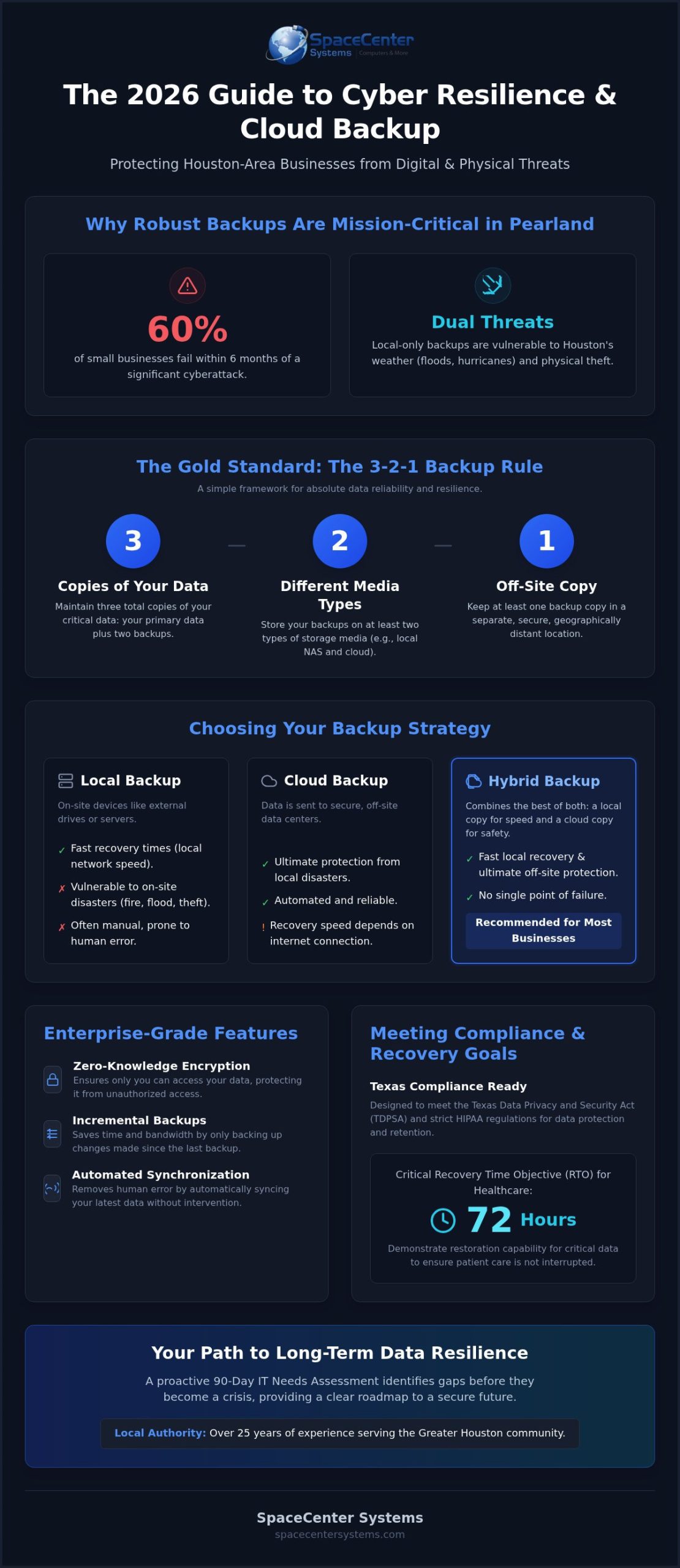
We understand that you want a “set it and forget it” strategy that keeps you compliant with the Texas Data Privacy and Security Act and modern HIPAA standards. This 2026 guide will show you how to move beyond simple storage and build true cyber resilience. You’ll discover how to meet the 72 hour restoration requirements and protect your legacy with professional strategies designed for our local community. We’ll outline how a 90 Day IT Needs Assessment helps identify gaps before they become crises. We’re going to break down the technical jargon and provide a clear roadmap to minimizing downtime, ensuring your business stays standing no matter what comes our way.
Key Takeaways
- Learn why Pearland’s unique weather patterns and evolving cyber threats make off-site data storage a critical requirement for local business continuity.
- Understand how to apply the 3-2-1 backup rule using cloud backup solutions pearland experts trust to keep your files safe and accessible.
- Discover the essential features of enterprise-grade storage, including zero-knowledge encryption and incremental backups that save time and bandwidth.
- Master the process of defining your Recovery Time Objective (RTO) to ensure your business resumes operations quickly after a data loss event.
- See how a 90-Day IT Needs Assessment from a local authority with over 25 years of experience provides a clear path to long-term data resilience.
Why Pearland Businesses Require Robust Cloud Backup Solutions
In our region, “business-grade” cloud backup is much more than a simple file copy. It’s a secure, off-site repository that acts as a mission-critical safety net. You’ve worked hard to build your business. Don’t let a single event take it away. While many owners think of backups as a technical chore, we view them as the foundation of data resilience. This means your operations don’t just survive a disaster; they’re built to bounce back immediately. For businesses seeking cloud backup solutions pearland provides, the focus must shift from simple storage to a comprehensive disaster recovery plan. We’ve moved past the days of swapping out physical tapes or portable hard drives. Modern systems use automated synchronization to ensure your latest data is always safe, regardless of what’s happening at your physical office. This shift allows you to focus on growth while we handle the technical heavy lifting.
The Vulnerability of Local-Only Backups
Relying solely on external hard drives or on-site servers is a high-stakes gamble. In the Greater Houston area, Gulf Coast weather patterns like flash flooding or hurricane-force winds can devastate an entire office in minutes. If your backup is sitting on the same desk as your primary computer, it’s just as vulnerable to water damage, fire, or physical theft. Manual backup habits also introduce the risk of human error. It’s common for employees to forget to plug in a drive or for a drive to fail silently because no one is checking the system health dashboard. Professional cloud systems remove these risks by automating the entire process. They sync data to secure data centers that are geographically distant from our local regional threats, providing a level of protection that a physical drive simply can’t match.
Meeting Industry Compliance in Texas
Compliance is a legal requirement that carries significant weight in 2026. The Texas Data Privacy and Security Act (TDPSA) and strict HIPAA regulations demand that businesses protect sensitive information with verified, redundant systems. For local medical practices, this includes demonstrating a 72-hour restoration capability for critical data to ensure patient care isn’t interrupted. We specialize in providing IT support for healthcare offices to ensure they meet these evolving standards. Using managed cloud backup solutions pearland businesses can trust ensures that audit logs are retained for the required six years and that patient data remains encrypted. This approach protects your reputation and helps you avoid the high costs of non-compliance, which can reach hundreds of thousands of dollars for even a single breach.
Local vs. Cloud vs. Hybrid: Finding the Right Backup Strategy
Choosing the right architecture is the first step toward a resilient IT disaster recovery plan. Local backups offer the fastest recovery times because data travels over your office network rather than the internet. However, as we discussed regarding Pearland’s weather risks, a local drive is only as safe as the building it’s in. Pure cloud backup provides ultimate off-site protection and scales effortlessly as your data grows. For many Houston firms, the hybrid approach has become the standard for professional cloud backup solutions pearland providers recommend. It combines the speed of local hardware with the geographic redundancy of the cloud, ensuring you aren’t reliant on a single point of failure.
The 3-2-1 Rule in a Modern Business Context
The 3-2-1 rule is the gold standard for data protection: maintain three copies of your data, on two different media types, with at least one copy stored off-site. Cloud backup fulfills the off-site requirement automatically without requiring you to carry drives home every night. At SpaceCenter Systems, we implement this by ensuring your primary data is mirrored to a secondary local device and then encrypted for transit to a secure data center. This redundancy ensures that even if a local server fails or a regional disaster occurs, your business remains operational. It’s a simple framework that provides absolute reliability for businesses that can’t afford a single hour of data loss.
When to Choose a Hybrid Backup Model
A hybrid model typically involves backing up your data to a local Network Attached Storage (NAS) device first, then synchronizing that device with the cloud. This workflow significantly reduces your Recovery Time Objective (RTO) for large files because you can pull them from your local network in minutes. If you’re interested in how these systems fit into your specific infrastructure, you can explore our backup solutions for detailed implementation options. This setup is particularly effective for businesses with large databases or media files that would take days to download over a standard internet connection. It provides a local “fast restore” point while keeping a disaster-proof copy in the cloud.
To determine which strategy fits your current budget and growth goals, consider starting with a 90-Day IT Needs Assessment to map out your recovery requirements and identify potential vulnerabilities in your current setup.
Essential Features of Enterprise-Grade Cloud Backup
Selecting the right cloud backup solutions pearland firms use requires looking past the price tag and focusing on technical features. To truly safeguard your business, your system must go beyond simple file storage. Enterprise-grade solutions prioritize security through end-to-end encryption and Zero-Knowledge storage. This architecture ensures that your data is encrypted before it ever leaves your office; only you hold the decryption keys. This level of privacy is one of the primary reasons businesses are choosing cloud over outdated physical media. We also implement incremental backups to maximize your office efficiency. Instead of uploading your entire database every day, the system only identifies and syncs the specific blocks of data that have changed. This approach saves significant bandwidth and ensures your network remains fast for your employees during business hours.
Ransomware Protection and Data Versioning
Ransomware remains a massive threat to local small businesses. In 2025, it was a factor in 88% of confirmed SMB data breaches. Unlike basic file synchronization tools that might simply mirror your encrypted files to the cloud, professional backup systems use data versioning. This allows you to roll back your entire system to a specific point in time before the infection occurred. It’s a critical component of our cyber security strategy. We combine this with 24/7 network monitoring to ensure your backup health is always optimal. If a backup fails or an anomaly is detected, our team is alerted immediately to resolve the issue before it impacts your business continuity.
Scalability for Growing Pearland Firms
Your technology should grow alongside your company. Cloud solutions offer seamless scalability, allowing you to increase your storage capacity without purchasing expensive new servers or hardware upgrades. This flexibility is vital for businesses managing remote or hybrid teams where data is generated across multiple locations. By incorporating these features into our managed IT services, we provide a “set it and forget it” experience. We handle the technical complexities of infrastructure management so you can focus on your core operations. This partnership ensures your data remains protected, compliant, and accessible as your Pearland business expands into new markets.
How to Build a Disaster Recovery Plan for Your Pearland Office
A resilient business continuity strategy starts with a clear roadmap rather than just a software installation. In Pearland, where storm surges or cyberattacks can disrupt operations without warning, having a documented plan is the difference between a minor hiccup and a permanent closure. When you’re evaluating cloud backup solutions pearland providers, the first step is always a comprehensive evaluation of your current infrastructure. This plan ensures that every team member knows their role when a crisis strikes, reducing panic and preventing costly mistakes.
Your roadmap should follow four critical steps. First, conduct a full IT assessment to identify and prioritize your mission-critical data assets, such as financial records and customer databases. Second, you must define your benchmarks for recovery to ensure your technology aligns with your business goals. Third, map out a clear communication chain so your team knows exactly who to contact for emergency IT support. Finally, you must regularly test the restoration process to ensure data integrity. A backup that hasn’t been verified recently is simply a storage of hope, not a guarantee of recovery.
Understanding RTO and RPO
Recovery Time Objective (RTO) is the maximum tolerable duration of downtime your business can sustain before suffering irreversible damage. Recovery Point Objective (RPO) is the maximum age of files that must be recovered from backup, which essentially determines how much data loss you can accept. These two metrics are the primary drivers behind the cost and complexity of the cloud backup solutions pearland experts design for your specific needs. If your RTO is one hour, you’ll require a more robust, high-speed system than a business that can afford to be offline for a full day.
Calculating the Real Cost of Downtime
Estimating the financial impact of an outage is essential for justifying your security budget and understanding your risks. In 2026, the typical cost of a data breach for an SMB ranges from $120,000 to $1.24 million, often making it a terminal event for unprepared firms. To calculate your specific hourly downtime cost, add your average hourly revenue to your employee salary costs and fixed overhead expenses. Don’t forget to account for the long-term reputational damage that occurs when you can’t serve your clients during a regional disaster. Formalizing this plan through a 90-day IT needs assessment allows you to bridge the gap between technical storage and true business survival.
Schedule a consultation to build your disaster recovery plan
Secure Your Data with SpaceCenter Systems’ Managed Cloud Solutions
SpaceCenter Systems has spent over 25 years growing alongside the Greater Houston business community. We’ve seen technology evolve from simple floppy disks to the complex, high-speed cloud backup solutions pearland companies rely on today. Our approach combines the absolute reliability of global cloud infrastructure with the neighborly warmth of a local partner. We believe in a “Zero-Clutter” philosophy. This means we handle the technical complexities, manage your system health dashboards, and ensure your hardware remains organized and efficient. You don’t need to feel overwhelmed by technical jargon or messy server rooms. Instead, you can transition from the constant anxiety of “Break-Fix” repairs to the quiet confidence of managed IT services. When you choose us, you’re choosing a partner that has successfully resolved a wide range of technical challenges since our founding era. We act as your internal technology department, providing a level of personalized support that faceless national corporations simply can’t match.
The Advantage of a Local Pearland IT Partner
Being located right here in the community means we understand the specific environmental and cyber risks you face. Our proximity to major business hubs allows us to provide hands-on support when you need it most. If a server fails or a network issue arises, a local provider responds faster than a national helpdesk stuck in a different time zone. We’ve built our reputation on being a dependable pillar for our peers. This local presence ensures that your cloud backup solutions pearland strategy isn’t just a ticket number; it’s a priority for a neighbor invested in your success. You can experience this personalized level of care through our on-site and remote IT support. We take pride in our historical tenure in the industry, which gives us the unique perspective needed to protect local enterprises.
Next Steps: Schedule Your Technology Consultation
The first step toward total data security is a clear understanding of your current vulnerabilities. During an initial backup and recovery audit, we perform a deep dive into your existing infrastructure. We don’t just look at your files; we look at your operational workflows to ensure nothing is missed. Our team provides practical, business-first recommendations that prioritize your efficiency and compliance with Texas data laws. We’ll help you map out a strategy that fits your growth goals and protects your legacy for years to come. Don’t wait for a disaster to test your resilience. Schedule a consultation with our Pearland team today to secure your future.
Secure Your Pearland Business Legacy
Building a resilient business in 2026 requires moving beyond simple file copies. You’ve learned how the 3-2-1 rule and hybrid storage models provide a mission-critical safety net against both regional disasters and evolving cyber threats. By defining your RTO and RPO benchmarks today, you ensure that your company can bounce back from any disruption with minimal financial impact. SpaceCenter Systems brings over 25 years of local Houston experience to every partnership, offering the specialized support for healthcare and senior living that modern compliance demands. Our team provides comprehensive 24/7 network monitoring so you don’t have to worry about silent backup failures. Investing in the professional cloud backup solutions pearland experts provide is an investment in your company’s longevity and peace of mind.
Schedule a Free IT Assessment for Your Pearland Business
We’re here to help you navigate these technical complexities with a neighborly approach that prioritizes your success. Let’s work together to build a more stable and secure future for your local enterprise.
Frequently Asked Questions
What is the difference between cloud storage and cloud backup for a business?
Cloud storage services like Dropbox or OneDrive are primarily designed for file sharing and accessibility. They don’t typically provide the automated, system-wide protection needed for disaster recovery. Professional backup solutions automatically mirror your entire environment, including applications and operating system settings, to a secure off-site location. This ensures you can restore your full business operations if a server fails, rather than just recovering individual files that were manually uploaded.
How much does cloud backup cost for a small business in Pearland?
Costs are typically structured as recurring monthly subscription fees based on the volume of data stored and the number of devices protected. Your investment depends on the specific recovery speed your business requires and the complexity of your network infrastructure. We recommend a professional assessment to determine the right tier for your operations. This ensures you only pay for the specific security and storage capacity required to maintain business continuity without paying for unnecessary overhead.
Is cloud backup secure enough for HIPAA-compliant medical offices?
Yes, professional cloud backup solutions pearland providers implement are designed to meet strict HIPAA and Texas Data Privacy and Security Act standards. These systems use end-to-end encryption to protect patient data during transit and while at rest in the data center. High-end providers offer Zero-Knowledge storage, meaning only your office holds the decryption keys. This ensures that sensitive healthcare records remain private and available for the legally required six-year retention period.
How long does it take to recover all my data if my server fails?
Recovery times vary based on your internet connection speed and the volume of data being restored. If you use a hybrid model with a local fast-restore point, you can often be back online in minutes. For pure cloud restorations, the process depends on the goals defined in your recovery plan. Our managed IT services monitor these speeds constantly to ensure your downtime stays within the limits your business can tolerate during a crisis.
Do I still need a local backup if I use a cloud backup solution?
We strongly recommend keeping a local copy as part of a comprehensive strategy. A local device allows for near-instant restoration of large files or databases without relying on internet bandwidth. While the cloud provides the essential off-site protection against regional disasters, the local component minimizes the cost of downtime for routine hardware failures. Combining both ensures your office has the fastest and most reliable recovery path possible for any scenario.
Can cloud backup protect my business from ransomware?
It’s your most effective defense against ransomware when paired with data versioning. Unlike simple sync tools that might mirror encrypted files, professional backup systems keep multiple historical versions of your data. If an attack occurs, we can roll your systems back to a clean state from before the infection. This eliminates the need to pay a ransom and ensures your critical customer records are restored with full integrity and minimal operational delay.
Does my Pearland business need a dedicated server for cloud backups to work?
You don’t necessarily need a dedicated physical server to utilize these services. Modern solutions can protect individual workstations, laptops, and virtual environments directly. However, for businesses with centralized data, we often implement a local Network Attached Storage device to manage the synchronization process efficiently. This hardware acts as a bridge, ensuring your backups are managed proactively without slowing down your daily network performance or requiring expensive infrastructure upgrades.
How often should my business data be backed up to the cloud?
Most professional cloud backup solutions pearland businesses use perform incremental backups continuously or at scheduled intervals throughout the day. Your specific backup frequency is defined by your operational needs and how much data you can afford to lose between syncs. If your business generates high volumes of transactions, you may need backups every fifteen minutes. For other offices, a nightly sync might be sufficient to protect your legacy and maintain compliance.
Find our answers helpful?
Add SpaceCenter Systems as a preferred source on Google to see more of our articles and answers in your search results.