
A warehouse Wi-Fi installation in Pasadena, TX, should be designed around the building, equipment, and daily workflows, not just the office internet connection. Reliable coverage depends on placing access points where workers and devices need connectivity, then using data cabling to connect network equipment where wireless signals alone are insufficient. A thoughtful design helps prevent dead zones from disrupting inventory scans, shipping tasks, and communications.
Before committing to a project, get a clear picture of the installation requirements and cost factors. The cost depends on warehouse size, building materials, coverage goals, equipment, and cabling needs, so the project scope should reflect the actual facility rather than a generic rate. This guide explains how to assess coverage, plan installation, and use structured cabling to strengthen the network. SpaceCenter Systems supports commercial Wi-Fi and cabling projects in Pasadena and the Houston area.
Key Takeaways
- Understand why internet service availability can vary by warehouse address, even within Pasadena.
- Identify how building layout, shelving, and equipment can affect wireless coverage and create operational dead zones.
- Separate the cost of an internet plan from the equipment and cabling needed to distribute Wi-Fi through a warehouse.
- See which site details shape an installation quote, including coverage goals and existing network infrastructure.
- Learn how managed IT, cybersecurity, cloud computing, and VoIP services can support business connectivity needs.
Provider availability in Pasadena
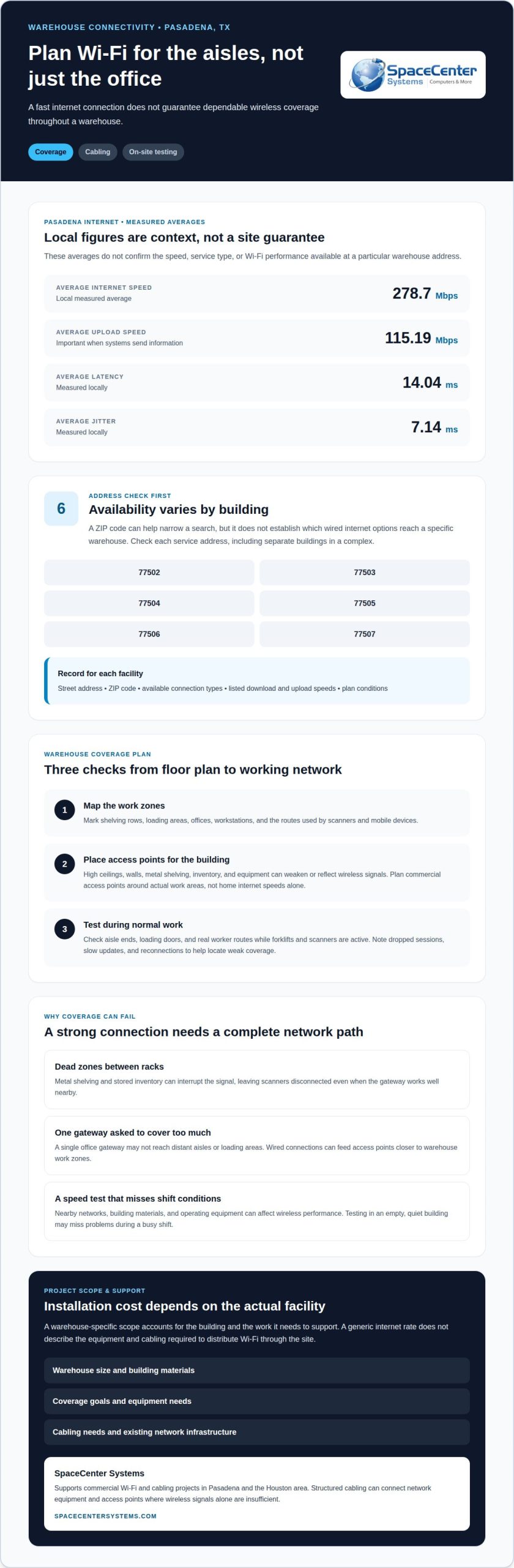
Internet availability in Pasadena depends on the service address, not just the city name. Pasadena includes ZIP codes 77502, 77503, 77504, 77505, 77506, and 77507. Those ZIP codes help narrow a search, but they don’t establish which internet service reaches a particular warehouse. Two buildings in the same ZIP code may have different wired options. A warehouse also needs a connection suited to business operations, not merely a residential plan advertised nearby.
Residential internet availability can provide a first indication of local infrastructure, but it doesn’t confirm that a residential plan suits a commercial building or its network demands. Home internet and warehouse connectivity serve different needs. Barcode scanners, office computers, shipping systems, and guest access, for example, may all use the same network. The right connection depends on the systems and users at the specific site.
Begin an address check with the complete street address, including suite or building details. Enter that address in an internet provider’s availability lookup. Compare the connection types shown, such as cable, fiber, or satellite, and record the listed download and upload speeds. Repeat the lookup for each building in a multi-building complex. A result for the main office may not apply to a detached warehouse or loading area.
Pasadena’s measured average internet speed is 278.7 Mbps. Treat that figure as local context, not a promise about one address or a warehouse connection. Available speeds vary by service type and provider. Download speed affects receiving data, while upload speed matters when systems send information. A business reviewing plans should match both directions to its applications. A high download figure alone doesn’t describe the full connection.
Check fiber availability at the exact service address. A nearby fiber network doesn’t necessarily mean the building can order fiber service. The lookup should identify fiber as available and show the plan’s listed speeds. Fiber can be relevant when a warehouse needs substantial two-way data transfer. If it isn’t available at the address, cable or satellite may appear as alternatives, each with different service characteristics.
Review plan terms as well as availability. Before selecting residential internet, check the monthly charge, contract length, installation conditions, and any autopay requirement. Terms can vary by plan and address. For a warehouse, clarify whether the plan is intended for business use. A residential listing alone doesn’t establish the service terms or support arrangements required for commercial operations.
Keep a simple address-check record for each Pasadena facility: street address, ZIP code, available connection types, listed speeds, and plan conditions. This makes differences between buildings easier to identify and prevents a residential availability result from being mistaken for a complete warehouse network plan. Internet service connects the site, but it doesn’t show whether Wi-Fi reaches every aisle, workstation, or loading area.
Pasadena’s measured average upload speed is 115.19 Mbps; measured average internet latency is 14.04 ms, and jitter is 7.14 ms. A 1 Gbps speed level is for more than five devices and households of six or more people.
Network coverage and reliability
A warehouse Wi-Fi installation in Pasadena, TX, must support work throughout the building, not just near the office. Metal shelving, inventory, forklifts, and high ceilings can affect coverage. A signal that works beside the gateway may weaken between storage racks, leaving scanners disconnected in distant aisles despite a fast internet connection. Home internet equipment, including an Xfinity gateway, may not suit warehouse coverage needs. Internet plans and internal Wi-Fi solve different problems.
For large warehouses with metal shelving, use commercial access points designed for business networks and place them to serve specific work areas. Metal can block or reflect radio signals, so a single powerful gateway may leave gaps at aisle level. Choose equipment based on the building, device needs, and mounting locations, not home internet speeds alone.
Plan access point placement on a warehouse floor plan. Mark shelving rows, loading areas, offices, and workstations, then identify where handheld scanners and mobile devices need continuous connectivity. Position access points to serve those operating zones while accounting for racks and walls. A coverage assessment can reveal weak spots before final placement. After installation, test connections along actual routes, including aisle ends and loading doors.
Reliability depends on the entire network path. A scanner needs a usable wireless signal and a working connection to business applications. If the gateway is in an office, wired connections may be needed to feed access points closer to warehouse work areas. Network infrastructure connects those access points to the wider system, avoiding reliance on one gateway to cover every aisle.
Interference can come from nearby wireless networks, building materials, and warehouse equipment. Assess the airwaves, choose suitable access point locations, and configure channels to limit overlap. Where practical, keep access points away from large metal surfaces. Test during normal operations, when forklifts and scanners are active. Testing in an empty, quiet building may miss interference during a busy shift.
Measure performance by task, not with a single speed test. Check whether scanners submit inventory updates from every aisle and whether mobile devices stay connected as workers move between zones. Note where downloads slow, sessions drop, or devices reconnect. These observations help distinguish weak coverage from application or upstream internet issues and guide targeted adjustments during a warehouse Wi-Fi installation in Pasadena, TX.
Warning signs include dead zones behind tall racks, dropped Wi-Fi calls, and devices that work only near the office. Record each problem by aisle or work area, then mark its location on the floor plan alongside access point positions. This creates a practical troubleshooting map and helps identify whether placement, cabling, interference, or the internet connection needs attention.
Provider prices and plan qualifications
Pasadena internet plan prices depend on the service address and connection type. For commercial service, a provider quotes pricing based on the address, speeds, contract terms, and installation needs. A residential offer may not describe the terms available to a warehouse. Compare business plans separately from home internet offers, even when both use the same local network.
Start with the exact warehouse address and request available business internet plans. Ask for the monthly rate after any introductory discount ends. A low advertised rate may require a contract, autopay, or paperless billing. Record each condition alongside the rate to compare the full commitment rather than a temporary promotion.
Plan eligibility can depend on whether service reaches the building and what equipment or installation the address requires. Providers may offer different plans at neighboring locations. A warehouse with fiber access, for example, may have options unavailable to another building on the same street. Confirm the address, connection type, installation requirements, and contract terms before comparing speeds.
Don’t treat a listed internet speed as guaranteed performance throughout the warehouse. The provider’s plan describes the incoming connection, while Wi-Fi coverage depends on the building’s network design. Check whether listed speeds refer to downloads, uploads, or both. Upload performance matters alongside downloads when inventory software sends frequent updates. Keep this distinction clear when reviewing provider quotes.
Providers in Pasadena may promote discounts tied to billing choices or introductory periods. Check whether a discount requires autopay, paperless billing, or a specific contract term. Record the regular rate, promotional period, and any equipment charges shown in the offer. If the price rises after the promotion, compare the ongoing amount rather than judging by the first bill.
Fiber internet can suit warehouses that move substantial data in both directions, but availability and plan eligibility depend on the service address. Compare a fiber listing by its stated upload and download speeds, contract conditions, and installation requirements. If fiber isn’t available, assess other wired options using the same criteria. Satellite may appear in availability searches, but its suitability depends on the warehouse’s actual network needs.
Use the same comparison sheet for each provider: address, connection type, monthly price, listed speeds, contract, discount conditions, and installation terms. Include the warehouse’s main applications, such as cloud inventory or shipping software, then match plan capabilities to those tasks. This separates internet service from internal Wi-Fi costs, which depend on coverage needs and network equipment.
Before choosing, get the provider’s written offer to clarify the standard rate and each qualification. A clear record keeps an introductory discount from obscuring longer-term costs. It also helps establish whether a plan supports the warehouse’s business use instead of assuming a residential offer will fit.
Pasadena’s average starting internet price is $84.23 per month. Separately, Politon Inc. installed customer-provided hardware in two conference rooms for DrinkPak in Fort Worth, Texas.
Warehouse Wi-Fi installation companies serving Pasadena, TX
Pasadena warehouses may need two distinct services: internet delivery and building-wide Wi-Fi. An internet provider connects the facility to its network; a network installer designs and deploys internal coverage. One company may handle both roles, or separate teams may coordinate. For example, fiber can reach the building while access points distribute Wi-Fi across storage aisles.
First define the work the installation must support. List warehouse devices and tasks, such as barcode scanning, inventory updates, shipping stations, and office access. The network can then be scoped around actual operating areas. A plan focused only on the office may leave loading zones or distant aisles without usable signal.
Ask how the installer will assess the facility before placing equipment. A useful site review considers the floor plan, rack locations, walls, ceiling height, and device routes. Tall metal shelving, for example, can interfere with signals between access points and scanners. The installation plan should account for these obstacles rather than assume a central gateway can serve every zone.
Clarify what the proposed project includes. The scope may cover network design, access point placement, cabling, equipment setup, and post-installation testing. Each item should specify the work area it supports. If a shipping station needs a wired connection, list that separately from wireless coverage. A clear scope prevents gaps between the internet handoff and warehouse operations.
Installation timing affects warehouse operations, so plan work around active receiving, picking, and shipping areas. A technician, for example, may need access to a ceiling route above a busy aisle. Staging the work by zone can simplify facility access and keep staff informed. The schedule should identify affected areas and the access required.
Testing should reflect real warehouse movement. Check scanner connections along normal picking routes, then test inventory updates at aisle ends and loading areas. If a device loses connection, record the location and adjust the design. A speed test near the gateway alone cannot show whether users have coverage across the facility.
Finally, clarify who handles each part of the network. The internet provider manages the connection to the premises; the Wi-Fi installer handles internal distribution. If the internet link works but scanners lose access in a distant aisle, the issue may be coverage or cabling rather than the incoming service. Clear responsibilities help teams diagnose problems efficiently.
What factors affect warehouse Wi-Fi installation pricing?
Warehouse Wi-Fi installation pricing reflects the facility layout and project scope. An open storage area differs from a site with offices, loading bays, and separate buildings. Pricing depends on the project and is provided after a quote request. Key cost factors include coverage goals, equipment, cabling, installation access, and testing.
Building size matters, but square footage alone doesn’t determine coverage. Tall ceilings, concrete walls, and metal racks affect signal travel. A warehouse with dense shelving may need access points positioned around specific work zones. The design should account for scanners along picking routes, shipping desks, and inventory stations rather than rely on a simple floor-area estimate.
Existing infrastructure can affect how much new work is required. An installation may use suitable network cabling already in place or require new cable runs to reach access points. A distant loading area, for example, may need a wired connection from the network room. Fiber-optic cabling may be appropriate when the building layout or connection distance calls for it.
Equipment needs depend on device types and quantities, the coverage plan, and how the network will be managed. Handheld scanners, office computers, printers, and wireless phones may share the system. The design must account for these devices in their actual work areas. Equipment choices should follow the site assessment, not a generic package.
Installation access also affects labor and scheduling. High ceilings may require different access methods than office-height spaces, while active receiving lanes can limit when crews can work. Projects covering several warehouse zones may need to be staged around operations. The quote should describe work areas, access assumptions, cabling routes, and installation tasks.
Testing requirements also shape project scope. A basic connection check near the network room won’t show how scanners perform at aisle ends. Include tests along normal routes, at shipping stations, and in loading areas. If testing reveals a weak spot, the team can determine whether placement, cabling, or configuration needs adjustment. Clear acceptance goals make the results easier to evaluate.
To prepare for a useful quote, provide a floor plan, identify critical device locations, and note current connection problems. Include planned changes to shelving or work areas. These details help the installer estimate the infrastructure and coverage the site needs. A clear quote can separate equipment, cabling, labor, and testing instead of blending distinct project requirements.
Request a warehouse Wi-Fi project quote
SpaceCenter Systems: Audio Visual Installation
SpaceCenter Systems provides Audio Visual Installation for businesses planning or upgrading workplace AV systems. In a warehouse, suitable displays and audio equipment can support staff communication, training, and operational briefings. Planning around room use and viewing needs helps align the system with employees’ work.
Consider this service when an existing AV setup no longer supports clear communication or a space needs new equipment. Contact SpaceCenter Systems to discuss your warehouse’s audio-visual needs.
Build a connectivity plan that supports your next shift
When planning warehouse Wi-Fi installation in Pasadena, TX, treat the network as part of your operating workflow. Note where connection interruptions would slow a shift, and use those priorities to guide technology decisions.
Keep an up-to-date record of network equipment, configuration changes, and areas where staff report connection issues. A shared reference helps your team respond consistently as warehouse needs change.
Clear operational priorities give your next technology decision a practical starting point.
Frequently Asked Questions
What Wi-Fi coverage and speed does a warehouse need?
Set requirements according to application needs and device behavior, not a single speed target. Inventory terminals, for example, may need to maintain sessions as users move, while a workstation uploading shipment records may need reliable upload capacity. Document business-critical applications and what happens when a device disconnects. This helps define practical acceptance tests, such as completing a scan or submitting a record during normal warehouse activity.
What cabling, power, and network upgrades are needed for warehouse Wi-Fi?
Check whether the network can support device addressing, traffic separation, and the power needs of planned equipment. Scanners, office computers, and guest devices, for example, may need different access controls. A network review can identify whether switch capacity, power delivery, or configuration changes are needed. Keep an updated record of equipment locations, cable labels, and network settings so troubleshooting doesn’t rely on staff memory.
How should I compare warehouse Wi-Fi installation quotes and service plans?
Compare how each proposal handles documentation, configuration changes, and ongoing maintenance. Request a clear handoff record showing equipment locations, network settings, and how to report faults. Check whether future layout changes, such as new racks or relocated workstations, affect the support scope. These details help operations staff understand who maintains the system and what information they need when a problem arises.
Find our answers helpful?
Add SpaceCenter Systems as a preferred source on Google to see more of our articles and answers in your search results.