

Yes, structured cabling installation in Houston can be scheduled around business hours to limit disruption in an occupied office. A sound project plan also includes testing and documentation, so connections are checked and recorded before they go into use. This approach can support a new build, renovation, or multi-site installation.
Noise, access to work areas, and temporary network interruptions are practical concerns during installation. Planning ahead helps manage them while creating cabling that supports daily operations and future growth.
This guide explains how installation is planned, what testing and certification involve, which project details shape the work, and how cabling can fit into an occupied Houston workplace. You’ll also learn what to consider when planning a new build, renovation, or multi-site deployment.
Key Takeaways
- Match copper or fiber cabling to the distance, network capacity, and systems each area needs to support.
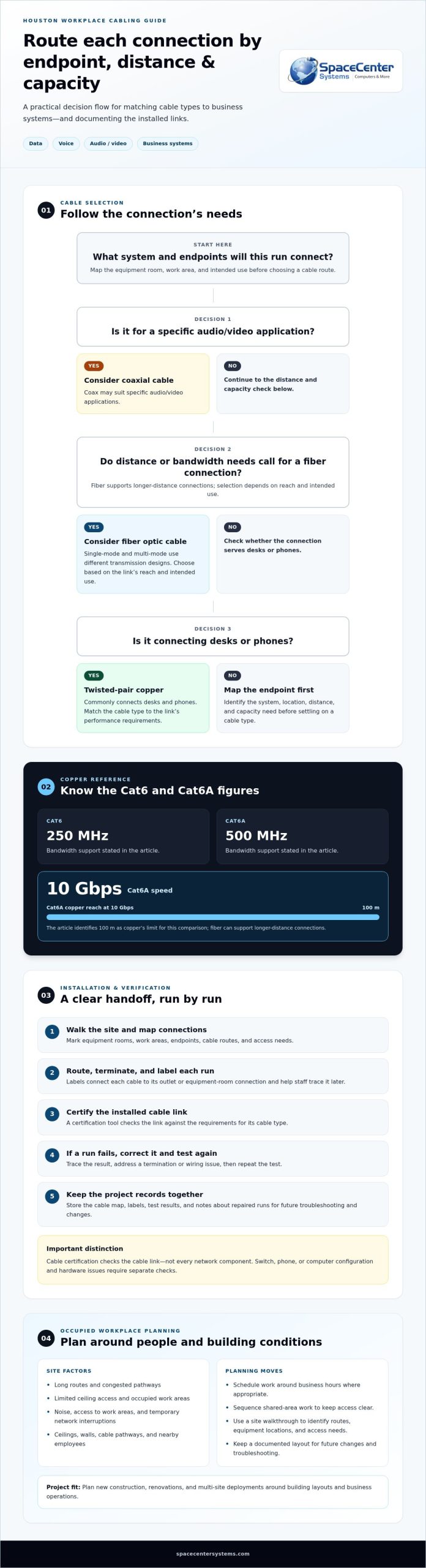
- Cat6A copper cabling carries 10 Gbps to 100 m, while fiber can support longer-distance connections.
- Testing and certification help confirm that installed cable connections meet their performance specifications.
- Clear cable routes, patch-panel terminations, and labels make connections easier to manage and trace.
- Plan new construction, renovations, and multi-site work around building layouts and business operations to keep projects organized.
Do you test and certify structured cabling installations?
Yes. Commercial cabling projects should include testing and certification to check each connection against its performance requirements. Houston-area low-voltage contractors and network infrastructure firms install business cabling. Their reviews are best compared using feedback about commercial projects, not unrelated residential work. Look for comments on scheduling, communication, workmanship, and resolving installation issues, since those details relate directly to an occupied office or business facility.
Testing checks whether installed cable links meet the requirements for their cable type. Cat6 supports bandwidth up to 250 MHz, while Cat6A supports up to 500 MHz and speeds up to 10 Gbps, according to CNiC. Cat6A copper cabling carries 10 Gbps to 100 m. Fiber optic cable supports longer-distance connections; single-mode fiber can carry laser light beyond copper’s 100 m limit. The appropriate option depends on the connection’s distance and capacity needs.
Start by identifying which systems the cabling will serve. Twisted-pair copper commonly connects desks and phones. Fiber can link network areas when distance or bandwidth needs call for it. Coaxial cable may suit specific audio/video applications. Mapping each connection to its endpoint helps define the installation. For example, a modern conference room may need network connections for displays, conferencing gear, and presentation hardware—a technical baseline that event production specialists like Straight Street Event Services emphasize when configuring reliable live and hybrid environments.
Fiber installation involves routing, termination, and testing. A link may also need splicing, troubleshooting, or repair if damaged or performing poorly. Single-mode and multi-mode fiber use different transmission designs, so selection depends on the link’s reach and intended use. A cable schedule helps technicians trace each run between equipment rooms and business areas.
Building conditions shape how a cabling project proceeds. Long routes, limited ceiling access, congested pathways, occupied work areas, and coordination around operating hours can add complexity. Work in a shared hallway, for example, may need to be sequenced to keep access clear. A site walkthrough helps identify routes, equipment locations, and access needs before installation begins.
For an occupied Houston office, planned work areas and schedules can help limit interruptions. A documented layout also gives staff a reference for future changes. Businesses planning commercial technology work in Houston can align cable routes with their facility’s needs. A structured cabling installation in Houston can support data, voice, and audio/video connections when the cable type and route suit each system.
Do you provide cable testing and certification?
Yes. Cable testing and certification should be part of the installation, not an optional follow-up. Houston cabling providers test Cat5e, Cat6, and Cat6a runs with a certification tool to check whether each cable meets its performance specifications. That process helps catch wiring faults before employees rely on the connection for network access, calls, or other daily work.
A clear workflow makes the installation easier to manage. Technicians label each run so its test record matches a specific outlet or equipment-room connection. They then terminate the cable at both ends and use a certification tool to check the installed link against the requirements for its cable type. If a run fails, the team traces the result, corrects the termination or wiring issue, and tests again. Keeping the results with the cable label makes later troubleshooting more direct.
Certification applies to the cable link, not every part of the network. A certified cable can still fail to provide service if a switch, phone, or computer has a separate configuration or hardware problem. Testing active network hardware is a distinct step: technicians can check whether equipment powers on, connects through the intended port, and passes network traffic. Separating these checks helps identify the source of a problem without assuming every connection issue is faulty wiring.
Technician credentials and cable test results are different. A cable test report describes a tested run; a technician credential describes a person’s training or qualification. Project records can identify who completed each test and store the results alongside the wiring labels. Safety planning is separate. Before work begins, account for ceiling access, ladders, cable pathways, and nearby employees so installation fits the facility’s working conditions.
For a practical handoff, keep the cable map, labels, test results, and notes about repaired runs together. If a workstation later loses its connection, staff can identify the outlet and trace its route instead of guessing among unmarked cables. The same records help during office moves or network changes by showing which connections were tested and where they terminate.
Testing and certification give business owners a useful baseline for installed cabling. A documented cabling project can make future troubleshooting more focused and help teams distinguish wiring faults from equipment issues.
Professional low-voltage cable installation in Houston
In Houston offices, organized low-voltage wiring connects workstations, phones, cameras, and other systems. A clear plan for routes, labels, and equipment locations makes future changes easier to manage.
Network Design and Cable Routing
Begin with a site walkthrough and connection map. Mark the equipment room, work areas, phone locations, and camera positions before choosing cable paths. This helps identify routes that avoid unnecessary crossings and keep connections close to the equipment they serve.
Low-voltage data cabling typically operates well under 50 volts. Routes through conduit or J-hooks help protect cable from strain. A plan should also account for ceilings, walls, access points, and occupied areas, so installers can sequence the work around the facility’s layout.
Cable Labeling and Documentation
Label both ends of every cable run with a matching identifier. For example, the label at a conference-room outlet should match the connection at the patch panel. This gives technicians a direct way to trace a link during an office move or network change.
Organize cable bundles by route and destination rather than mixing unrelated runs. A cable map can record each identifier, room, outlet, and panel port. These details help staff locate a connection without testing multiple unlabeled cables or interrupting nearby workstations.
Racks and Patch Panel Management
Terminate horizontal cable runs at a patch panel, then connect the required panel ports to network equipment. A readable port layout helps technicians identify which connection serves a desk, phone, or camera. It also makes changes easier to track as the office adds or relocates equipment.
Use cable management to keep bundles orderly and reduce strain near terminations. Leave enough access to trace a run or work on a port without disturbing neighboring connections. Installation should follow the TIA/EIA-568 standard, which organizes structured cabling into defined subsystems.
A useful handoff links the physical layout to the records staff will need later. Ask for a floor plan or cable schedule showing each run’s origin and destination, along with its rack and patch-panel port. For a Houston facility, these records can help a technician isolate a faulty connection instead of guessing among similar-looking cables.
- Before installation: Identify workstations, phones, cameras, and equipment locations on the site plan.
- During routing: Use conduit or J-hooks where appropriate, and keep cable paths organized.
- At termination: Land each run at the patch panel and label both ends consistently.
- At handoff: Provide a cable map that ties room labels to panel ports and destinations.
These steps give facilities and IT staff a practical reference for maintenance, moves, and network changes. In an occupied office, clear routes and records also help crews focus their work and avoid unnecessary disruption.
Planning Cabling Across Houston and Nearby Communities
Businesses in Houston and nearby communities may have different cabling needs at each facility. A Houston headquarters may need new workstation connections, while a Pearland office may need a limited network change. Planning by location defines the work without assuming every building needs the same installation.
Local project planning can take account of facilities in Houston, Pearland, League City, Friendswood, Sugar Land, and Pasadena. A professional office may need data and voice connections at employee work areas; a warehouse may need network cabling across operational zones. The building layout, equipment locations, and available cable pathways help shape the scope at each address.
Move, add, and change work refers to updates to an existing network. A move relocates a desk, department, or equipment area. An add creates a connection for a new workstation or shared device. A change updates an existing route or connection, such as moving a printer to another room. Recording each update keeps project records aligned with the facility’s current layout.
- Move: Identify a connection’s current location and new destination before relocating equipment.
- Add: Map the new endpoint and route a cable to the appropriate network area.
- Change: Update connection records when a room, device, or route changes.
For businesses with several local facilities, maintain a separate project record for each site. Include the address, floor or work area, connection purpose, and completion status. A Houston office might need workstation connections, while a League City location needs an update to its existing layout. Separate records help operations teams track work accurately.
Before scheduling a structured cabling installation Houston businesses can rely on, prepare a brief for each facility. Note operating hours, occupied areas, equipment rooms, planned changes, and connections that must remain available during work. This helps SpaceCenter Systems plan access and sequence tasks. For example, organizing work by department can help keep other parts of an office accessible.
Consider who will use the network records after installation. Clear connection details help staff identify the right outlet or device when an office changes. If a business adds a suite in Sugar Land or relocates a team in Pearland, existing records can show which copper runs remain useful and where new connections may be needed. That context helps define the project scope.
Each facility needs a plan based on its layout and business requirements. Reviewing sites individually helps decision-makers coordinate updates, manage office changes, and avoid treating every location as identical. It also gives facilities and operations teams a practical reference for future network work in Houston and nearby communities.
New construction, renovations, and multi-site deployments
Plan cabling alongside construction or renovation rather than as a last-minute installation. Early coordination aligns routes, equipment locations, and business operations before walls and ceilings limit access.
New Construction and Renovation Cabling
For a new Houston facility, map workstations, meeting rooms, network equipment, and wireless access points before walls are closed. Wireless systems still rely on capable cabled infrastructure, so routes should support access-point locations as well as wired devices.
During a renovation, compare the proposed layout with the existing network plan. Identify which rooms are changing, which connections need to move, and where additional capacity is needed. Coordinating cable pathways with the construction schedule can reduce rework after ceilings or walls are finished.
Retrofit and Multi-Site Projects
A retrofit works within an existing building, where pathways, access, and operating hours shape the installation sequence. Plan around occupied departments and coordinate work by area. This helps keep unaffected parts of the business operating while installation proceeds.
For multi-site deployments, document each facility’s layout and requirements separately, then align naming and design conventions across locations. A Houston office and another site may need different routes or equipment-room arrangements, even when they support the same business systems.
Capacity planning should reflect how employees and systems use the network. CNiC lists Cat6a cable as supporting speeds up to 10 Gbps. The right design depends on the organization’s applications, equipment, and planned growth. A project plan can distinguish immediate requirements from infrastructure intended for later expansion.
Installation sequencing matters. In new construction, coordinate pathway and cable work with the construction schedule, then complete terminations and testing before the space is occupied. For a retrofit, identify access points and work areas in advance. An office might schedule work in one department while another continues normal operations.
Multi-site teams benefit from a shared handoff format. Record each site’s cable map, equipment locations, test results, and outstanding work. These records give operations staff a consistent view of what was installed while preserving each facility’s unique layout. They also make future additions easier to plan without assuming every location has the same routes.
A written project sequence helps the business coordinate its contractor, facilities staff, and internal technology team. Set out the work areas, access needs, installation stages, and handoff documents before work begins. For new construction, renovation, or retrofit planning, pre-wiring for commercial facilities can be part of the project plan.
SpaceCenter Systems: Managed IT Services
SpaceCenter Systems helps businesses manage the technology that depends on reliable network connections. Its structured cabling and low-voltage infrastructure services support connected systems, while Managed IT Services help with day-to-day IT operations and network issues.
This support is useful when employees rely on connected systems for routine work or a growing organization needs ongoing oversight. SpaceCenter Systems also provides Cybersecurity, Cloud Computing, and VoIP Phone Systems to support other parts of a business’s technology environment.
For ongoing support beyond installation, explore Managed IT Services and contact SpaceCenter Systems to discuss your business needs.
Plan Your Network Around What Comes Next
Your cabling plan should support how your business expects to operate, not just its current floor plan. Before moving ahead with structured cabling installation in Houston, consider upcoming office changes, new applications, and how teams at different sites will connect. A clear view of those priorities helps shape infrastructure decisions around continuity and practical growth.
SpaceCenter Systems can help connect cabling decisions with broader technology needs. Managed IT Services support ongoing IT operations, while Cybersecurity and Cloud Computing address other parts of a business’s technology environment. Considering these needs together can help decision-makers plan infrastructure around daily operations.
Choose a next step that fits your project stage, whether you’re preparing a new build, planning a renovation, or updating an existing workplace. SpaceCenter Systems offers project consultations to clarify scope and priorities for your business.
A well-planned network gives your team a stronger foundation for the work ahead.
Frequently Asked Questions
Can cabling be installed without disrupting an occupied Houston office?
Yes, installation can be planned to limit disruption, but work areas and network access need coordination. Before scheduling, identify departments that rely on uninterrupted connections, such as reception or payment processing. Then sequence work by zone and arrange access to ceilings, offices, and equipment rooms. Crews can focus on a separate area while employees continue working elsewhere. A clear plan tells staff which spaces or connections will be affected.
Can you cable a new build or retrofit an existing Houston property?
Yes, structured cabling can be planned for both new construction and existing properties. A new build allows routes and equipment locations to be coordinated with construction. A retrofit starts with the building’s current pathways, network areas, and business activity. Adding a department to an occupied office, for example, may require new connections while preserving access to existing work areas. Define new runs separately from changes to current infrastructure.
Do you handle permits and inspections?
Define permit and inspection responsibilities in the project scope. Requirements depend on the work and the applicable local authority, so the plan should identify who submits any required paperwork and coordinates inspections. A cabling project within broader construction may need different coordination from a change using existing pathways. Keep approval and inspection documents with the project closeout materials for the property’s facilities records.
How does structured cabling installation work?
A typical project moves from site planning to installation and handoff. First, identify rooms, devices, and network equipment locations. Then map intended cable routes and project access needs. Crews run and terminate the cables, then complete the agreed testing and labeling. The final handoff should connect room or device names with their network locations, giving facilities staff a usable record when devices move or teams change spaces.
How much does network cabling cost per drop?
The price per drop depends on the project and is provided after a quote request. Scope can vary with cable type, route, endpoint, and termination needs. Access also matters: a clear pathway differs from a route around finished walls or occupied rooms. A useful quote request identifies the destination, intended use, building conditions, and whether the connection is part of a larger installation.
What services are included in structured cabling installation?
A structured cabling project can include planning routes, installing and terminating cables, testing connections, and documenting locations. The scope may cover copper or fiber runs for network, voice, or other business systems. A new office area, for example, may need connections mapped to workstations and shared equipment. Agree on what the handoff records will show, such as room identifiers and network destinations, so staff can manage future office changes.
How much does structured cabling installation cost in Houston, TX?
The project price depends on the scope and is provided after a quote request. It can reflect the number and type of cable runs, building access, route complexity, and work in existing or newly constructed spaces. Testing, termination, documentation, and coordination around business operations also shape the work. A clear project brief helps a quote reflect the facility’s actual layout rather than a generic estimate.
What factors affect structured cabling installation pricing?
Pricing depends on cable type, route length, access conditions, termination needs, and project scope. An open pathway can require different work from a route through a finished or crowded area. The schedule also matters if installation must be coordinated around occupied workspaces. For a useful estimate, document the rooms, equipment locations, desired connections, and whether the project covers one facility or several. These details clarify the labor and materials involved.
Find our answers helpful?
Add SpaceCenter Systems as a preferred source on Google to see more of our articles and answers in your search results.