
What if your remote employees sounded like they were sitting in a high-end Sugar Land office, even when they’re working from a home kitchen? You likely already know that relying on personal cell phones or spotty home Wi-Fi creates a fragmented, unprofessional experience for your clients. Managing VoIP for remote teams Sugar Land requires more than just a software download; it demands a stable, managed infrastructure that keeps your staff connected without the frustration of dropped calls.
As a local partner that has supported the regional economy since 1995, we understand the specific technical hurdles local businesses face. This guide provides the roadmap to building a communication system that’s as dependable as a traditional landline but with the flexibility of the cloud. You’ll learn how to unify your team’s tools into one professional interface, secure your business data against remote access threats, and significantly lower your monthly overhead. We’ll walk through the essential steps to transition your workforce into a cohesive, high-performing unit that reflects the excellence of your brand.
Key Takeaways
- Maintaining a professional image is easier when you replace fragmented personal cell phone use with a unified, cloud-based phone system that works anywhere.
- You’ll learn the essential steps to deploy VoIP for remote teams Sugar Land, starting with a 90-day IT assessment to ensure your infrastructure can handle the transition.
- Integrating your communication tools with CRMs like Zoho or Salesforce allows your team to sync call data automatically and improve daily operational efficiency.
- Professional network monitoring and Quality of Service (QoS) settings solve the problem of dropped calls by prioritizing voice traffic over other home internet activities.
- Partnering with a local authority like SpaceCenter Systems provides the peace of mind that comes from 30 years of technical expertise and personalized support.
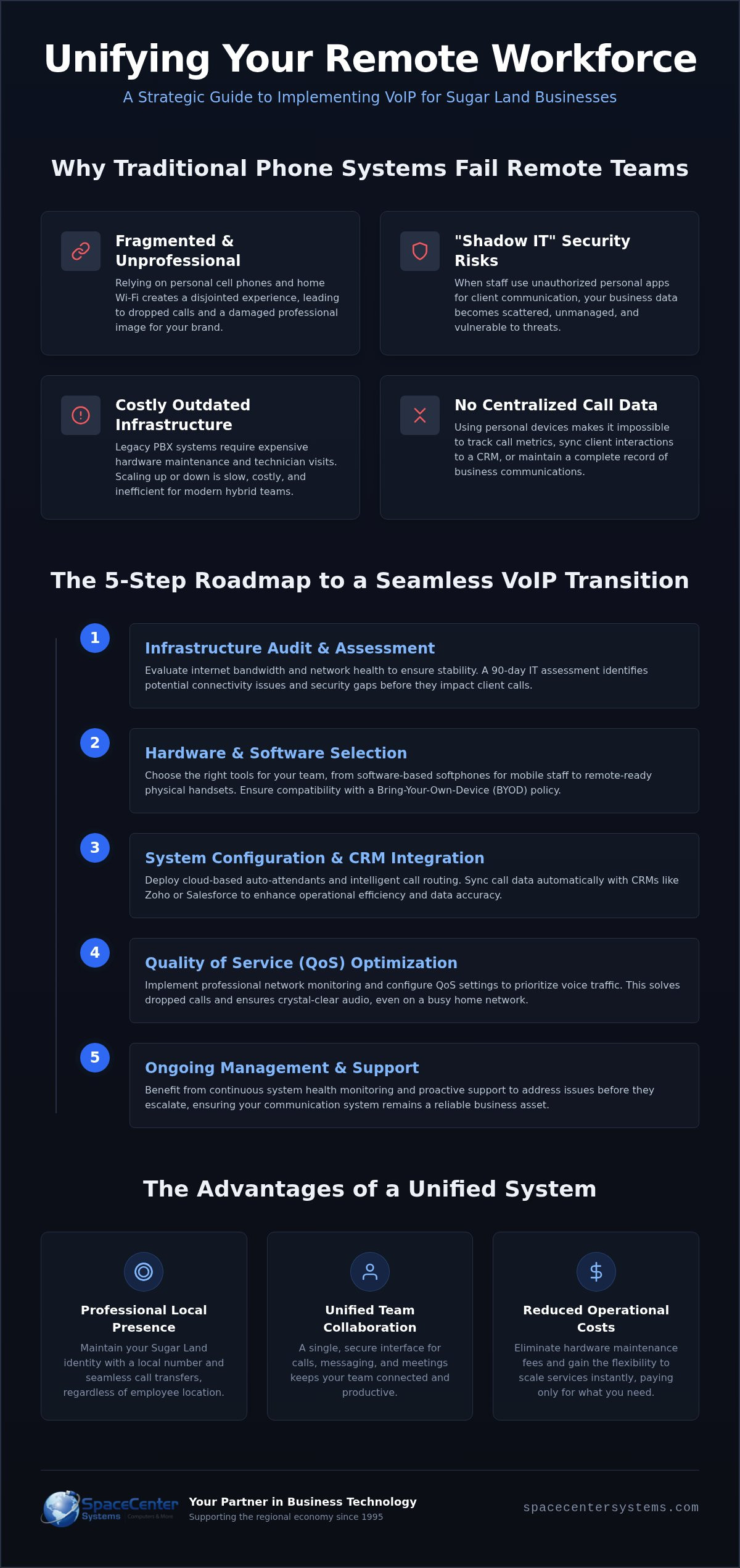
Why Traditional Phone Systems Fail Remote Teams in Sugar Land
Traditional phone systems were built for a different era of business. When your staff worked exclusively in a central office, a hardware-dependent PBX system made sense. Today, that same equipment often acts as a bottleneck. It tethers your employees to a physical location or forces them to use unreliable call-forwarding tricks. To understand why this fails, we first need to look at What is VoIP and how it differs from legacy copper lines. Implementing modern VoIP for remote teams Sugar Land ensures that your communication remains fluid, regardless of where your staff opens their laptops.
When employees lack professional tools, they often resort to “shadow IT.” This happens when staff use unauthorized apps or personal messaging services to communicate with clients. It’s a security risk that leaves your business data scattered across various personal accounts. Beyond security, there’s a branding cost. Relying on personal mobile numbers hurts your professional image and makes it impossible to track call metrics or maintain a centralized record of client interactions. Modern businesses need a system that integrates every conversation into a secure, managed environment.
The Professionalism Gap: Office vs. Home
Maintaining a consistent business identity is vital for local trust. When a client calls your office, they should experience a seamless transition to the right department. Modern VoIP systems use cloud-based auto-attendants to manage this flow. This technology allows you to maintain a strong Sugar Land local presence even when your workforce is distributed. Your clients see a local number on their caller ID, and your staff presents a unified front that builds confidence. It’s about ensuring the person working from home has the same professional capabilities as someone sitting at the main office desk.
The Cost of Outdated Infrastructure
Legacy phone systems come with heavy maintenance fees and the constant threat of hardware failure. You’re often paying to maintain physical desk phones and onsite servers that your hybrid team rarely uses. This outdated infrastructure is rigid; adding a new line often requires a technician visit and new hardware. Cloud VoIP offers a more logical approach. You can scale your extensions up or down instantly to match your current headcount. Switch to cloud VoIP to eliminate hardware maintenance and gain global mobility for your entire organization. This shift reduces operational friction and ensures your communication budget is spent on actual connectivity rather than aging plastic and wires. Local businesses looking to quantify these savings can explore the VoIP cost savings Sugar Land businesses are achieving in 2026 by modernizing their infrastructure.
5 Steps to Implement VoIP for Your Remote Workforce
Transitioning to a modern phone system doesn’t have to be a source of stress for your leadership team. Implementing VoIP for remote teams Sugar Land successfully requires a logical sequence of actions that prioritize stability and security. By following a structured deployment plan, you ensure that your staff remains productive and your professional image stays intact. It’s about moving away from reactive troubleshooting and toward a proactive, managed communication ecosystem.
Step 1: The Infrastructure Audit
You can’t build a reliable communication system on a shaky foundation. The first step involves evaluating your current internet bandwidth to ensure it can handle concurrent voice calls without degradation. Many home office setups suffer from “dead zones” or insufficient upload speeds that lead to jitter and lag. We recommend implementing network monitoring early in the process to gain visibility into system health. This data allows you to address connectivity issues before they impact a client call. Additionally, aligning your setup with NIST security guidelines for VoIP protects your business data from the vulnerabilities often found in unmanaged remote environments.
Step 2: Hardware and Software Selection
Choosing the right tools depends on how your team works. You might prefer softphones (software-based phones) for staff who travel, or remote-ready physical handsets for those who want a traditional desk experience. A 90-day IT needs assessment is the most effective way to determine which hardware and software mix fits your operational goals. If you opt for a “bring your own device” (BYOD) policy, you must ensure that all secure apps are compatible with your existing business tools. This step ensures that every employee has a reliable interface that connects seamlessly to your central office logic.
Once your foundation is set, focus on the configuration and human elements of the transition:
- Configure call routing: Set up hunt groups so that incoming calls ring through to available team members in a specific order.
- Test home networks: Conduct speed tests at various times of the day to ensure voice traffic remains a priority.
- Train your team: Ensure everyone knows how to use unified features like voicemail-to-email and SMS integration.
Taking these steps creates a professional, unified front for your business. If you’re ready to modernize your office, you can schedule a consultation with our local team to discuss your specific infrastructure needs.
Essential VoIP Features for Remote Collaboration
Modern business communication has evolved far beyond simple voice transmission. For organizations implementing VoIP for remote teams Sugar Land, the focus shifts toward how these tools integrate with existing workflows to maintain productivity. According to the FCC guide to VoIP, the technology allows for advanced features that traditional lines simply cannot support. This includes unified messaging, where voicemails are transcribed and sent directly to your email, and SMS integration that lets staff text clients from their business number without using personal devices.
Streamlining Customer Interactions
One of the most significant advantages of a cloud-based system is the ability to sync your phone activity with your customer database. When you integrate your calls with HubSpot, Zoho, or Salesforce, every interaction is logged automatically. CRM integration acts as the bridge between communication and sales data. This prevents remote staff from losing customer data during busy shifts and provides leadership with a clear view of team activity through system health dashboards. Additionally, call recording serves as a vital tool for remote quality control and training. It allows managers to review interactions and provide specific feedback to staff, ensuring that your professional standards remain high even when the team is distributed.
Enhancing Internal Teamwork
Internal teamwork in a virtual environment relies on knowing your colleagues’ availability. Presence indicators show who is ‘at their desk’ or currently in a meeting, which reduces the friction of a virtual office and prevents unnecessary call transfers. VoIP apps now include instant messaging and file sharing, allowing teams to collaborate on documents while still on a call. Setting up virtual ‘ring groups’ ensures that incoming calls reach an available team member rather than going to a dead-end voicemail. If you’re comparing specific capabilities for your office, you can read our guide on how to choose a business phone system for a deeper dive into modern feature sets.
Video conferencing is another essential layer of the modern VoIP ecosystem. With a single click, your team can move from a voice call to a face-to-face meeting to resolve complex issues quickly. This flexibility keeps remote teams connected and maintains the human element of business interactions. By unifying these features into one platform, you eliminate the need for multiple expensive subscriptions and create a more efficient, professional workspace for your entire staff.
Solving the Reliability Puzzle: Connectivity and Security
Reliability is often the biggest hurdle when deploying VoIP for remote teams Sugar Land. While national providers might promise high uptime percentages, those figures don’t account for the “last mile” of connectivity: the employee’s home internet. When a staff member says, “I can’t hear you,” the issue is rarely the cloud server. It’s usually local network congestion. We solve this by implementing Quality of Service (QoS) settings. This technical configuration prioritizes voice traffic over less critical data like large file downloads or background updates. It ensures your client calls remain crisp and uninterrupted even on a shared home connection.
Effective troubleshooting for these remote issues is a core part of managed IT services. Instead of leaving your staff to struggle with home routers, our team monitors the connection quality and provides direct assistance through system health dashboards. This proactive approach keeps your business moving without the downtime caused by technical friction. It allows your leadership to focus on operations rather than playing the role of an IT helpdesk.
Securing the Remote Connection
In addition to optimizing your network, it’s beneficial to explore how comprehensive support models can protect your entire organization. To learn more about proactive technology solutions, discover OC Cubed – Your trusted MSP.
Security is the second piece of the reliability puzzle. Remote voice traffic is data, and data is a target. Without robust cybersecurity measures, your system is vulnerable to “vishing” (voice phishing) and toll fraud. Toll fraud occurs when bad actors gain access to your system to place expensive international calls on your bill. We use encrypted VoIP protocols to wrap your conversations in a layer of protection. For healthcare providers in the Sugar Land area, this level of security is essential for maintaining HIPAA compliance while staff work from home.
The Importance of Local Support
When a technical glitch happens, your team doesn’t have time to wait in a national call center queue. A local technician understands the regional infrastructure and can often resolve issues faster than a faceless corporation. We provide on-site support for home office network troubleshooting when remote fixes aren’t enough. This ensures your staff isn’t left stranded by a hardware failure or a complex wiring issue. Partner with a local provider to ensure your remote team has 24/7 helpdesk access and the peace of mind that comes from a 30 year history of local expertise.
If you want to secure your remote workforce with a communication system that actually works, get a quote from our team today.
Why SpaceCenter Systems is the Right Choice for Sugar Land VoIP
Choosing a technology partner is a decision that impacts your business’s stability for years. Since 1995, SpaceCenter Systems has grown alongside the Sugar Land business community. We’ve spent over 30 years refining our approach to business technology, ensuring that our clients receive more than just a software license. When you implement VoIP for remote teams Sugar Land through us, you’re gaining a partner invested in your long-term operational success. We don’t offer one-size-fits-all packages. Instead, we provide personalized consultations that address the specific technical challenges of your unique workforce.
Our approach is fundamentally holistic. We recognize that a phone system is only as good as the network supporting it. That’s why we combine our VoIP solutions with robust network security protocols. This ensures that your voice traffic is not only clear but also protected from external threats. We have a proven track record with specialized sectors, including healthcare and property management, where privacy and reliability are non-negotiable. Our team understands the rigorous standards required for these industries and builds systems that exceed those expectations.
Beyond the Phone: A Technology Partnership
We believe that communication is a mission-critical function that must be protected at all costs. To achieve this, we integrate your VoIP system directly into a comprehensive business continuity plan. This ensures that even if a local disaster occurs, your team remains reachable and your business stays operational. You get direct access to local experts who know the Sugar Land area and its specific infrastructure. We aren’t a faceless national call center. We’re your neighbors, and we’re committed to the same standard of excellence that has defined our brand for three decades.
Get Started with a Local IT Assessment
Your journey toward a more professional communication system begins with a thorough evaluation of your current state. During your initial VoIP consultation, we’ll examine your existing bandwidth, hardware needs, and remote workflows. We tailor a system to your specific team size, ensuring you have exactly the features you need without paying for those you don’t. This pragmatic approach respects your budget while maximizing your team’s efficiency. You’ll receive a clear roadmap for deployment and a dedicated support team to manage the transition. Schedule your Sugar Land VoIP assessment today to experience a more personalized level of technical support.
Modernize Your Business Communication for 2026 and Beyond
Modernizing your communication infrastructure is the most effective way to ensure your workforce remains cohesive and professional. By moving away from legacy hardware and adopting VoIP for remote teams Sugar Land, you eliminate the technical friction that leads to dropped calls and security vulnerabilities. A successful transition requires a structured IT assessment, the right mix of unified features, and a commitment to managed network security. These steps provide the stability your business needs to grow in an increasingly hybrid economy.
As a local authority serving the Houston area since 1995, SpaceCenter Systems brings 30 years of technical expertise to your organization. Our A+ BBB Rating reflects our dedication to absolute reliability and community support. With dedicated support teams in Sugar Land and Pearland, we provide the proximity and proficiency that national providers can’t match. We’re ready to help you build a system that supports your staff and impresses your clients with every interaction.
Schedule Your Remote VoIP Consultation with SpaceCenter Systems today to start your transition. We look forward to helping your business thrive in the modern hybrid world.
Frequently Asked Questions
Can my employees use their existing home internet for VoIP?
Yes, most standard residential internet connections provide sufficient bandwidth for high quality voice calls. The primary concern isn’t usually the speed but the stability of the connection. We recommend using a wired Ethernet connection instead of Wi-Fi whenever possible to reduce jitter. Our team can use network monitoring tools to evaluate your staff’s home setups and ensure they meet the technical requirements for reliable communication.
Is VoIP secure enough for remote employees handling sensitive data?
Modern VoIP systems are highly secure when they’re configured with the right cybersecurity protocols. We implement encrypted voice traffic and secure sign-on methods to protect your business conversations from interception. Managing VoIP for remote teams Sugar Land involves setting up firewalls and monitoring for unusual activity like toll fraud. These layers of protection ensure that your sensitive data remains private even when accessed from a home office environment.
Do I need to buy new desk phones for everyone working from home?
You don’t necessarily need to purchase new hardware for a remote workforce. Many businesses choose to use softphones, which are applications installed on laptops or desktop computers. Other employees prefer using mobile apps on their existing smartphones to stay connected. While physical handsets are available for those who prefer a traditional desk experience, the software-based approach offers the most flexibility and helps lower your initial equipment costs significantly.
What happens to our phone system if the office internet goes down?
Your phone system stays active in the cloud even if your physical office loses power or internet connectivity. Because the system’s logic lives in a secure data center, calls can still be routed to remote workers or mobile applications without any interruption. This built-in redundancy is a core feature of a professional business continuity plan. It ensures that your clients can always reach your team, regardless of local utility issues at your headquarters.
Can we keep our current Sugar Land business phone numbers?
You can keep your existing phone numbers through a process called porting. We manage the transition with your current carrier to ensure your local identity remains intact. Maintaining your local presence is vital for building trust within the community. We also help you set up new local or toll-free numbers if your business is expanding. This process is seamless and prevents any downtime during your transition to a modern cloud-based system.
How much bandwidth does a remote VoIP call actually use?
A single VoIP call typically uses less than 100 kbps of bandwidth, which is a very small fraction of most home internet plans. The quality of the call depends more on the consistency of the data flow than the total speed. Implementing VoIP for remote teams Sugar Land effectively involves managing latency and packet loss. We help you configure Quality of Service (QoS) settings on routers to prioritize voice data over less critical background traffic.
Is VoIP compliant with HIPAA for remote healthcare workers?
VoIP technology can be fully HIPAA compliant if it’s configured with the correct security and privacy settings. This includes end-to-end encryption for voice and data, as well as strict access controls for call recordings and voicemails. We work with healthcare providers in the Sugar Land area to ensure their systems meet all regulatory requirements. This allows your medical staff to handle patient communications securely from their home offices while maintaining total legal compliance.
How long does it take to transition a team to a remote VoIP system?
The transition typically takes between one and three weeks, depending on the number of users and the complexity of your call routing. The most time-consuming part of the process is often porting your existing numbers from your old carrier. We handle all the technical heavy lifting, including the initial 90-day IT assessment and staff training. Our goal is to move your team to the new system with zero downtime and minimal disruption to your daily operations.
Find our answers helpful?
Add SpaceCenter Systems as a preferred source on Google to see more of our articles and answers in your search results.