


Imagine you are mid-pitch with a major client in Downtown Houston when your video feed freezes and the “connection unstable” alert appears. It is a frustrating scenario that many local business owners face, especially when employees waste time waiting for cloud-based apps to load or deal with dead zones in the back office. You aren’t alone in feeling that your current setup just can’t keep up with the demands of a modern workspace.
This guide shows you how to improve office wifi Houston by addressing the technical and environmental factors that slow your team down. With the mainstream adoption of WiFi 7 in 2026, your business needs more than a basic router to maintain a competitive edge. We will look at why consumer-grade hardware fails in professional environments and how following Houston’s ANSI/TIA-568 cabling standards creates a foundation for success. You’ll learn the specific steps to achieve seamless connectivity across your entire footprint, ensuring your VoIP phones and mission-critical applications run at peak performance. By the end, you will understand how to build a reliable, high-speed network that lets you focus on your business instead of your signal strength.
Key Takeaways
- Calculate the hidden costs of minor daily connectivity issues to understand the true impact of unreliable internet on your company’s bottom line.
- Identify the specific physical barriers and signal interference patterns common in Downtown Houston and the Energy Corridor that are stifling your office speeds.
- Learn exactly how to improve office wifi Houston by using structured cabling to create a high-speed backbone for your wireless access points.
- Implement immediate performance gains by optimizing your device frequencies and isolating non-essential traffic with a secure guest network.
- Discover how proactive monitoring and managed IT support can transform your network into a dependable, maintenance-free business utility.
The Business Impact: Why Unreliable WiFi is Costing Your Houston Company
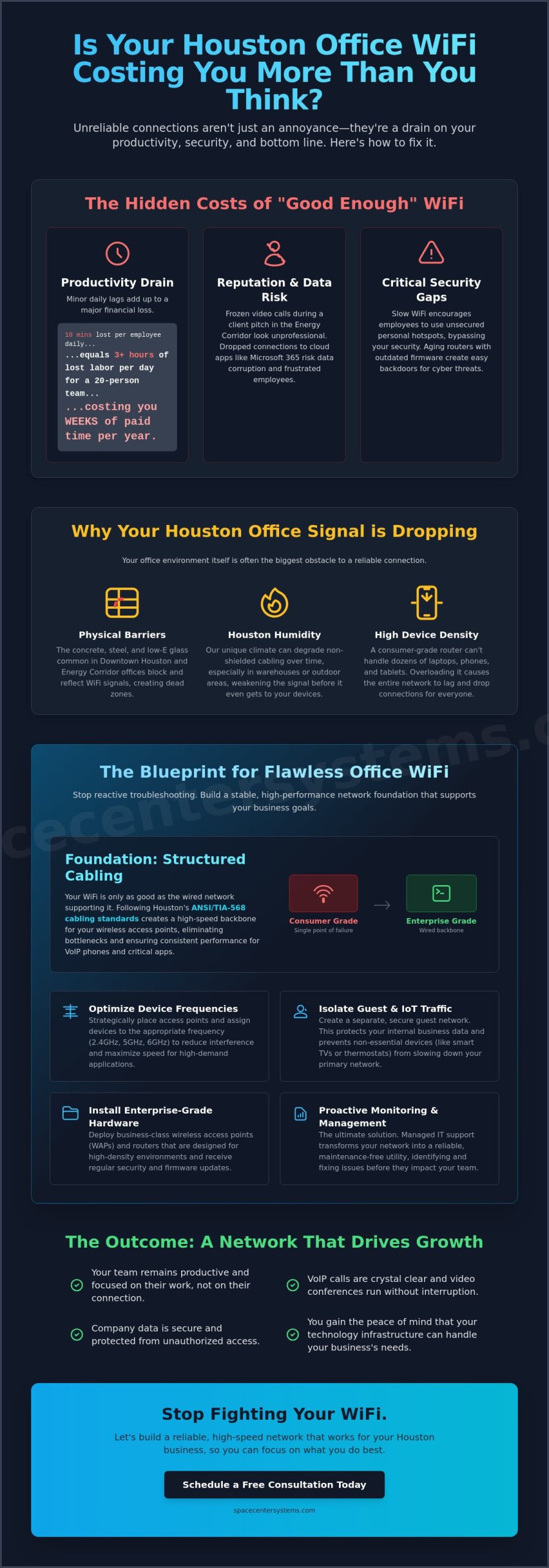
In a modern office, WiFi is no longer a luxury or an optional perk for the breakroom. It is a mission-critical business utility, just as vital as electricity or running water. When your connection falters, your entire operation grinds to a halt. For many business owners, the search for how to improve office wifi Houston begins only after a major failure, but the hidden costs of “good enough” connectivity accumulate every single day.
Transitioning to a professionally managed network moves your business away from reactive troubleshooting and toward a stable environment. The outcome is immediate. Your team remains productive, and your technology supports your goals instead of hindering them. You gain the peace of mind that comes from knowing your infrastructure can handle peak loads without breaking a sweat.
The Hidden Costs of Dropped Connections
Technical glitches have a way of happening at the worst possible moments. We have all seen “buffer face,” that frozen, pixelated expression on a colleague’s face during a high-stakes video conference. When this happens during a presentation to a new client in the Energy Corridor, it damages your professional reputation. It suggests that your firm might not have the infrastructure to handle their business.
Beyond optics, inconsistent signals pose a threat to your data integrity. When cloud-based applications like Microsoft 365 or specialized accounting software lose their connection during a sync, you risk data corruption or lost progress. This leads to employee frustration and, eventually, higher turnover. Professionals want to work in an environment where their tools actually work.
Security Risks of Unoptimized Office Networks
A weak or unreliable WiFi signal is more than a nuisance; it is a security vulnerability. When the office network is slow, employees often take matters into their own hands by using personal mobile hotspots. This bypasses your company’s security protocols and leaves your data exposed. Ensuring a strong, reliable signal is a fundamental part of Cybersecurity for small business Houston.
Furthermore, many businesses rely on aging routers with outdated firmware. These devices often contain known backdoors that local cyber threats can exploit. A managed network ensures your hardware is always updated and your traffic is properly segmented, protecting your proprietary information from unauthorized access.
Identifying the Bottlenecks: Why Your Houston Office Signal is Dropping
Houston’s architectural landscape is built on concrete, glass, and steel. While these materials make for beautiful offices in Downtown or the Energy Corridor, they are essentially signal killers. If your team struggles with dropped connections, the problem often lies in the physical environment. Thick concrete walls and the low-E glass used in modern energy-efficient buildings reflect WiFi signals rather than letting them pass through. This creates dead zones where productivity simply stops.
Device density is where most small businesses hit a wall. A router designed for a family of four can’t handle 30 employees, each with a laptop, a smartphone, and a tablet. When too many devices fight for the same limited bandwidth, the router’s internal processor becomes overwhelmed. This leads to the lag and “connection timed out” errors that disrupt your workday and frustrate your staff.
The Problem with Consumer-Grade Hardware
Many business owners try to save costs by using retail mesh systems or all-in-one home routers. These devices are built for best effort traffic, not the mission-critical demands of a professional office. Professional Wireless Access Points (WAPs) distribute the load across multiple units. This allows for seamless roaming as you walk from the lobby to the boardroom. Unlike consumer gear, enterprise hardware includes management features that allow us to prioritize VoIP traffic. This ensures your client calls never drop even when the rest of the team is syncing large files to the cloud.
Interference in the Houston Spectrum
In dense business hubs like Sugar Land or Pearland, your WiFi isn’t just competing with your own devices. It’s fighting against the signals of every neighboring business in the building. This 2.4GHz frequency overlap creates a noisy environment that slows everyone down. Common office appliances like microwaves and Bluetooth headsets only add to this invisible clutter. A professional site survey can map these obstacles accurately. If you’re tired of guessing where the signal goes, an IT consulting review can provide a clear heat map of your office to identify and fix these bottlenecks permanently.
The Foundation of Speed: Why Structured Cabling is Non-Negotiable
It’s a common misconception that wireless networks are entirely wireless. In reality, the most effective way to achieve enterprise-grade speed is to ensure your invisible signals are supported by a robust physical foundation. High-quality structured cabling acts as the highway for your data, delivering it from your server room to the access points scattered throughout your office. Without this wired backbone, your wireless signal is forced to do all the heavy lifting, which inevitably leads to congestion and slowdowns.
One of the most effective strategies for anyone wondering how to improve office wifi Houston is the concept of “offloading.” If a device doesn’t move, it shouldn’t be on the WiFi. By plugging in stationary equipment like desktop workstations, printers, and VoIP phone systems, you remove unnecessary traffic from your wireless frequencies. This results in zero-latency performance for your most critical tasks. It also leaves the wireless spectrum wide open for mobile users on laptops and tablets, ensuring they stay connected as they move between meetings.
Backbone Cabling vs. Horizontal Cabling
Your network architecture is typically divided into two functional parts. Backbone cabling connects your central server room to different wings or floors of your building. Horizontal cabling then extends that connection from the local distribution point to individual desks or access points. In 2026, Cat6 or Cat6a is the standard for Houston businesses because it supports the multi-gigabit speeds required by modern WiFi 7 hardware. Professional cable management is also vital. Organized racks prevent the “spaghetti” of tangled wires that traps heat and causes equipment failure.
Wireless Access Points (WAPs) vs. Range Extenders
Many small business owners try to fix dead zones with cheap range extenders. This is a mistake. An extender simply listens to a signal and repeats it, which immediately cuts your available bandwidth in half. Instead, professional WAPs connect directly to your structured cabling foundation. They allow your team to move through the office without losing their connection or needing to switch networks manually. Using Power over Ethernet (PoE) allows these units to receive power and data through a single cable, keeping your installation clean and professional while maintaining maximum speed.
5 Strategic Steps to Improve Your Office WiFi Today
Implementing a few targeted changes can yield immediate results for your team’s productivity. If you are looking for how to improve office wifi Houston without a total hardware overhaul, these strategic steps provide a clear roadmap. These actions move your network from a source of daily frustration to a dependable business tool.
- Step 1: Force a 5GHz-only SSID. Create a specific network ID (SSID) that only uses the 5GHz band. Connect your high-performance work laptops and tablets here. This band is faster and less crowded than the standard 2.4GHz frequency.
- Step 2: Implement a Guest Network. Isolate visitor traffic on its own network. This prevents a guest’s smartphone from accessing your private company data and ensures their streaming doesn’t slow down your operations.
- Step 3: Update all firmware and drivers. Manufacturers regularly release patches for performance bugs and security vulnerabilities. Keeping your access points and computer network cards updated ensures you aren’t fighting outdated code.
- Step 4: Reposition Access Points. WiFi signals travel better when they have a clear line of sight. Move your equipment away from metal cabinets or heavy machinery. Mounting them high on walls or ceilings provides the best coverage.
- Step 5: Schedule a professional network audit. Sometimes the bottleneck is invisible. A professional review identifies signal interference and configuration errors that basic troubleshooting often misses.
Optimizing Frequency and Channels
The 2.4GHz frequency is great for range, but it is incredibly slow and prone to interference. In a business context, 5GHz is the superior choice for throughput. Many routers use “Auto” settings for channel selection, but this often fails in crowded Houston business parks. When every office in your building uses “Auto,” routers constantly jump channels to avoid each other, causing brief but disruptive disconnections. SSID management allows you to control exactly how and where your devices connect for maximum stability.
Managing Your Bandwidth
Not all data is equal. Quality of Service (QoS) settings allow you to tell your router which traffic matters most. You should always prioritize Business VoIP systems Pearland to ensure client calls remain crystal clear. Without QoS, a large personal cloud backup or a high-definition video stream can steal the bandwidth needed for your phone system. A Guest WiFi portal is also a smart move. It allows you to set speed limits for non-employees, ensuring your staff always has the resources they need to work efficiently. If you are ready to eliminate the guesswork, schedule a professional network audit to see exactly where your bandwidth is going.
Why Managed IT is the Ultimate Solution for Houston Offices
Many business owners spend their valuable time trying to figure out how to improve office wifi Houston on their own. While the manual steps we have discussed provide a solid foundation, the most reliable way to achieve enterprise-grade stability is through Managed IT Services. This approach shifts your technology strategy from a “break-fix” model, where you only call for help after a failure, to a proactive monitoring system that prevents problems before they start.
For companies operating in League City and Sugar Land, having a local partner means receiving the support you need from experts who understand our regional business environment. The outcome is a network that scales effortlessly as your company grows from five employees to more than 50. You gain a “set it and forget it” infrastructure that works as hard as you do, backed by a partner with over 25 years of experience in the community.
Proactive Monitoring vs. Reactive Repair
Proactive monitoring means SpaceCenter Systems identifies WiFi issues before your employees even notice a drop in speed. We track signal strength and hardware health in real time. If an access point begins to underperform, we often resolve the issue through remote troubleshooting. This reduces the need for on-site service calls and keeps your operational costs predictable. Regular security patching is also a core part of this service. We ensure your firmware is always current, protecting your office from local cyber threats without requiring any manual effort from your staff.
Scalability for Future Growth
A professionally designed network accommodates new hires without compromising the speed of your current team. As you add more devices, your infrastructure must be able to distribute the load efficiently. This is especially vital when integrating Cloud computing services Houston with your WiFi foundation. When your cloud applications and wireless signals work in harmony, your business achieves the agility needed to compete in a fast-paced market. We help you build a system that meets your needs today and expands for your needs tomorrow.
Stop letting inconsistent connectivity hold your business back. Our team provides the neighborly, approachable support of a local firm with the rigorous technical standards of a high-end technology authority. Schedule your free network audit with SpaceCenter Systems today and experience the peace of mind that comes from a truly reliable office network.
Build a Faster Future for Your Houston Office
A reliable network is the backbone of any successful modern company. It requires a strategic blend of high-quality structured cabling and professional wireless configuration. By moving away from consumer-grade hardware and adopting enterprise standards, you eliminate the dropped calls and slow load times that frustrate your staff. Mastering how to improve office wifi Houston is about more than just speed; it’s about creating a stable environment where your team can perform at their best without technical interruptions.
SpaceCenter Systems has spent over 25 years supporting the local business community. Our Pearland-based team specializes in comprehensive Managed IT and Security bundles that provide the “set it and forget it” reliability you need. We’re here to ensure your technology supports your growth instead of hindering it. Your business doesn’t have to settle for inconsistent signals or dead zones.
Get a Professional WiFi Audit for Your Houston Business
We’re ready to help you build a network you can finally depend on. Let’s get started on making your office connectivity a competitive advantage for years to come.
Frequently Asked Questions
How many access points does my Houston office actually need?
Most professional environments require one access point for every 1,500 to 2,500 square feet, but your specific layout dictates the final count. If your Houston office features heavy concrete walls or glass partitions, you’ll likely need more units to ensure signals penetrate every room. A professional site survey is the most reliable way to map your space and eliminate dead zones before they disrupt your team.
Can I just use a mesh WiFi system from a big-box store for my office?
Retail mesh systems are built for home use and generally lack the processing power to manage 30 or more business devices at once. They don’t offer the advanced security features or traffic prioritization that a growing company needs. For a stable, “set it and forget it” network, enterprise-grade access points are the better investment to prevent constant reboots and connectivity drops.
Why does my WiFi work fine in the morning but slow down in the afternoon?
Afternoon slowdowns are often caused by increased signal interference from neighboring businesses in your Houston office park. As other companies reach peak activity, the airwaves become crowded with competing signals. Additionally, your own team’s usage typically peaks in the afternoon as video calls and cloud backups happen simultaneously, which can overwhelm unoptimized or consumer-grade hardware.
Is it better to use 2.4GHz or 5GHz for a business office?
You should prioritize 5GHz for all high-performance work devices because it offers much faster speeds and is less prone to interference. While 2.4GHz has a longer range, it’s incredibly congested in dense areas like Downtown Houston or the Energy Corridor. Using 5GHz ensures your VoIP phones and cloud applications have the clean, fast connection they need to stay stable.
How much does it cost to have professional structured cabling installed in Houston?
The investment for structured cabling depends on the number of “drops” or individual cable runs your office requires and the type of cable used, such as Cat6 or Cat6a. Building architecture, including ceiling height and wall materials, also plays a role in the total project scope. Quality cabling is a fundamental part of learning how to improve office wifi Houston because it provides the high-speed backbone your wireless system relies on.
Can my office WiFi be hacked if I have a strong password?
A strong password is a good start, but hackers can still gain access through outdated firmware or unpatched security vulnerabilities in your hardware. Without proactive monitoring and regular updates, your network remains exposed to local cyber threats. This is why we prioritize comprehensive cybersecurity and managed support to protect your proprietary data from unauthorized access.
What is the difference between a modem, a router, and an access point?
A modem brings the internet signal into your building, while a router manages the traffic between your devices and the internet. An access point connects to the router via a physical wire and broadcasts the wireless signal to your team. In a professional environment, using separate, dedicated components for each task provides much better performance than a single all-in-one retail device.
How do I stop guests from slowing down our office internet?
The best way to manage guest traffic is to create a dedicated Guest Network that is completely isolated from your main business data. You can set specific bandwidth limits on this network to ensure visitors don’t consume the resources your staff needs for mission-critical tasks. This configuration protects your security while maintaining the high-speed connectivity required for your daily operations.